 02b2bb0453
- LayoutSettings.vue: 新增 sub-sidebar 预览元素和 copy-config-dialog 样式
- LayoutSettings.vue: PageSwitchingAnimationOptions 枚举导入,修正 Double 布局样式

vue3-element-template
Vue3 + Vite + TypeScript Enterprise Admin Frontend Template





Introduction
vue3-element-template is the lite version of vue3-element-admin, built with Vue 3, Vite, TypeScript, and Element Plus, paired with 9 mainstream backends + derivatives (covering Java / Node.js / Go / Python / PHP / C# / Rust 7 languages) and the mobile app youlai-app. Other frontend versions: TypeScript · JavaScript · NaiveUI.
Project Features
-
Simple and Easy-to-use: Upgraded version of vue-element-admin for Vue3, with minimal encapsulation and easy to get started.
-
Data Interaction: Support both local
Mockdata and remote API. Comes with Java backend source code and online API documentation. -
Permission Management: Complete permission system for users, roles, menus, dictionaries, and departments.
-
Essential Infrastructure: Dynamic routing, button permissions, internationalization, code style, Git commit conventions, and common component encapsulation.
-
Continuous Updates: Since 2021, the project has maintained an open-source status with continuous updates, integrating new tools and dependencies in real time, and has accumulated a broad user base.
System Preview
PC
 |
 |
 |
 |
 |
 |
Mobile
 |
 |
 |
 |
Ecosystem
Frontend
| Project | Tech Stack | Description |
|---|---|---|
| vue3-element-admin | Vue 3 + Vite + TS + Element Plus | PC Admin (Main) |
| vue3-element-admin-js | Vue 3 + Vite + JS + Element Plus | JavaScript Version |
| vue3-element-template | Vue 3 + Vite + TS + Element Plus | Lite Template |
| youlai-app | Vue 3 + UniApp | Mobile App |
Backend
| Project | Tech Stack | Description |
|---|---|---|
| youlai-boot | Spring Boot + MyBatis-Plus | Java (recommended) |
| youlai-nest | NestJS + TypeORM | Node.js |
| youlai-gin | Go + Gorm | Go |
| youlai-django | Django + DRF | Python |
| youlai-fastapi | FastAPI + SQLAlchemy | Python |
| youlai-think | ThinkPHP + ThinkORM | PHP |
| youlai-aspnet | ASP.NET Core + EF Core | C# |
| youlai-axum | Axum + SeaORM | Rust |
youlai-boot also provides variants: Multi-tenant · MyBatis-Flex · Spring Boot 3 · PostgreSQL · Multi-module
All eight backends share the same RESTful API and database schema, frontends can switch seamlessly.
Project Setup
# Clone the repository
git clone https://gitee.com/youlaiorg/vue3-element-template.git

# Change directory
cd vue3-element-template

# Install pnpm
npm install pnpm -g

# Install dependencies
pnpm install

# Start the project
pnpm run dev
Project Deployment
# Build the project
pnpm run build

# Upload files to the remote server
Copy the files generated in the `dist` directory to the `/usr/share/nginx/html` directory.

# nginx.cofig configuration
server {
	listen     80;
	server_name  localhost;
	location / {
			root /usr/share/nginx/html;
			index index.html index.htm;
	}
	# Reverse proxy configuration
	location /prod-api/ {
			proxy_pass http://vapi.youlai.tech/; # Replace vapi.youlai.tech with your backend API address
	}
}
Local Mock
The project supports both online API and local mock API. By default, it uses the online API. If you want to switch to the mock API, modify the value of VITE_MOCK_DEV_SERVER in the .env.development file to true.
Backend API
If you have a basic understanding of Java development, follow these steps to convert online API to local backend API and set up a full-stack development environment.
- Get the backend source code based on
JavaandSpringBootfrom youlai-boot. - Follow the instructions in the backend project's README.md to set up the local environment.
- Modify the value of
VITE_APP_API_URLin the.env.developmentfile tohttp://localhost:8989, replacing it with the backend API URL.
Notes
-
Auto import plugin is disabled by default
Component type declarations have been automatically generated for the template project. If you add and use new components, follow the instructions in the screenshot to enable automatic generation. After automatic generation is complete, remember to set it back to
falseto avoid conflicts.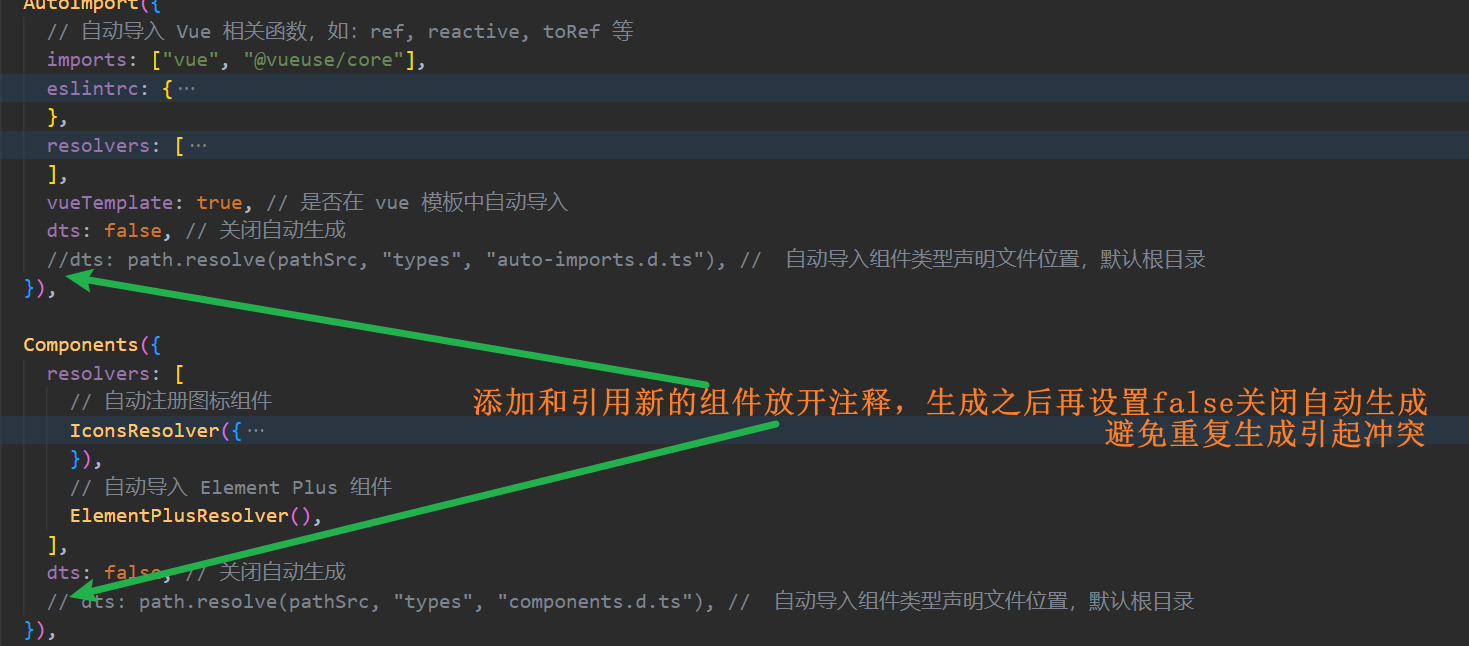
-
Blank page when accessing the project
Try upgrading your browser, as older browser engines may not support certain new JavaScript syntax, such as optional chaining operator
?.. -
Red highlight on project components, functions, and imports
Restart VSCode to try again.
-
Other issues
If you have any other issues or suggestions, please open an issue.
Project Documentation
-
Building a Backend Management System from Scratch with Vue3, Vite, TypeScript, and Element-Plus
-
ESLint+Prettier+Stylelint+EditorConfig for Standardized and Unified Frontend Code Style
-
Git Commit Conventions with Husky, Lint-staged, Commitlint, Commitizen, and cz-git
Commit Conventions
Execute pnpm run commit to invoke interactive git commit and complete the information input and selection according to the prompts.

 WeChat Official Account |
 Mini Program |
 Add Author WeChat |
Technical Exchange · Issue Feedback · Business Cooperation