mirror of
https://github.com/HBAI-Ltd/Toonflow-app.git
synced 2026-05-31 08:18:31 +08:00

733 lines
32 KiB
Markdown
733 lines
32 KiB
Markdown
<img src="https://capsule-render.vercel.app/api?type=waving&color=gradient&customColorList=6,11,20&height=200§ion=header&text=Toonflow&fontSize=90&fontColor=ffffff&animation=fadeIn&fontAlignY=50" width="100%"/>
|
||
|
||
<p>
|
||
<a href="https://github.com/HBAI-Ltd/Toonflow-app">
|
||
<img src="https://img.shields.io/badge/GitHub-181717?style=flat-square&logo=github&logoColor=white" alt="GitHub" />
|
||
</a>
|
||
|
|
||
<a href="https://gitee.com/HBAI-Ltd/Toonflow-app">
|
||
<img src="https://img.shields.io/badge/Gitee-C71D23?style=flat-square&logo=gitee&logoColor=white" alt="Gitee" />
|
||
</a>
|
||
|
|
||
<a href="https://gitcode.com/HBAI-Ltd/Toonflow-app">
|
||
<img src="./atomgitLogo.svg" alt="Atomgit" style="height:20px"/>
|
||
</a>
|
||
</p>
|
||
|
||
<p align="center">
|
||
<a href="../README.md">简体中文</a> |
|
||
<a href="./README.zhtw.md">繁體中文</a> |
|
||
<a href="./README.en.md">English</a> |
|
||
<a href="./README.th.md">ไทย</a> |
|
||
<a href="./README.vi.md">Tiếng Việt</a> |
|
||
<strong>日本語</strong> |
|
||
<a href="./README.ru.md">Русский</a>
|
||
</p>
|
||
|
||
<div align="center">
|
||
|
||
<img src="./logo.png" alt="Toonflow Logo" height="120"/>
|
||
|
||
[](https://git.io/typing-svg)
|
||
|
||
<p align="center">
|
||
<a href="https://github.com/HBAI-Ltd/Toonflow-app/stargazers">
|
||
<img src="https://img.shields.io/github/stars/HBAI-Ltd/Toonflow-app?style=for-the-badge&logo=github" alt="Stars Badge" />
|
||
</a>
|
||
<a href="https://www.apache.org/licenses/LICENSE-2.0" target="_blank">
|
||
<img src="https://img.shields.io/badge/License-Apache%202.0-blue.svg?style=for-the-badge" alt="Apache-2.0 License Badge" />
|
||
</a>
|
||
<a href="https://github.com/HBAI-Ltd/Toonflow-app/releases">
|
||
<img alt="release" src="https://img.shields.io/github/v/release/HBAI-Ltd/Toonflow-app?style=for-the-badge" />
|
||
</a>
|
||
</p>
|
||
<p align="center">
|
||
<a href="https://github.com/HBAI-Ltd/Toonflow-app/network/members">
|
||
<img src="https://img.shields.io/github/forks/HBAI-Ltd/Toonflow-app?style=for-the-badge&logo=github&color=orange" alt="Forks Badge" />
|
||
</a>
|
||
<a href="https://atomgit.com/HBAI-Ltd/Toonflow-app">
|
||
<img src="https://img.shields.io/badge/AtomGit-G--Star%20No.540-FF6B35?style=for-the-badge&logo=git&logoColor=white" alt="AtomGit G-Star No.540" />
|
||
</a>
|
||
<a href="https://discord.gg/HEjKmpNpAZ">
|
||
<img src="https://img.shields.io/badge/Discord-Community-5865F2?style=for-the-badge&logo=discord&logoColor=white" alt="Discord" />
|
||
</a>
|
||
</p>
|
||
<p align="center">
|
||
<a href="https://github.com/HBAI-Ltd/Toonflow-app/issues">
|
||
<img src="https://img.shields.io/github/issues/HBAI-Ltd/Toonflow-app?style=for-the-badge&color=F48D73" alt="Issues" />
|
||
</a>
|
||
<a href="https://github.com/HBAI-Ltd/Toonflow-app/graphs/contributors">
|
||
<img src="https://img.shields.io/github/contributors/HBAI-Ltd/Toonflow-app?style=for-the-badge&color=2088FF" alt="Contributors" />
|
||
</a>
|
||
<a href="https://github.com/HBAI-Ltd/Toonflow-app/commits">
|
||
<img src="https://img.shields.io/github/last-commit/HBAI-Ltd/Toonflow-app?style=for-the-badge&color=blueviolet" alt="Last Commit" />
|
||
</a>
|
||
</p>
|
||
<p align="center">
|
||
<img src="https://ziadoua.github.io/m3-Markdown-Badges/badges/TypeScript/typescript2.svg" alt="TypeScript" />
|
||
<img src="https://ziadoua.github.io/m3-Markdown-Badges/badges/NodeJS/nodejs2.svg" alt="Node.js" />
|
||
<img src="https://ziadoua.github.io/m3-Markdown-Badges/badges/Docker/docker2.svg" alt="Docker" />
|
||
<img src="https://ziadoua.github.io/m3-Markdown-Badges/badges/Electron/electron2.svg" alt="Electron" />
|
||
</p>
|
||
<p align="center">
|
||
<img src="https://mobaicons.com/icons/typescript,nodejs,electron,docker,socket?perline=5" alt="Tech Stack Icons" />
|
||
</p>
|
||
<p align="center">
|
||
<img src="https://widgetbite.com/stats/HBAI-Ltd" alt="Visitors" />
|
||
</p>
|
||
|
||
> 🚀 **オールインワンのショートドラマエンジン**:テキストからキャラクター、絵コンテから動画まで、ゼロハードルで全工程をAI化、制作効率10倍以上!
|
||
</div>
|
||
|
||
<div align="center">
|
||
<a href="./g-star.png" target="_blank">
|
||
<img src="./g-star.png" alt="AtomGit G-Star 認証証明書" width="100%"/>
|
||
</a>
|
||
</div>
|
||
|
||
---
|
||
|
||
# 🌐 多言語サポート
|
||
|
||
Toonflow は以下の言語のインターフェースに対応しています:
|
||
|
||
| 言語 | Language |
|
||
| ---------- | --------------------- |
|
||
| 简体中文 | Chinese (Simplified) |
|
||
| 繁體中文 | Chinese (Traditional) |
|
||
| English | English |
|
||
| ไทย | Thai |
|
||
| Tiếng Việt | Vietnamese |
|
||
| 日本語 | Japanese |
|
||
| Русский | Russian |
|
||
|
||
> 💡 他の言語も準備中です。翻訳のご協力をお待ちしています!
|
||
|
||
---
|
||
|
||
# 🌟 主な機能
|
||
|
||
Toonflow はショートドラマ制作のためのAIワークベンチです。「企画→脚本→絵コンテ→映像出力」の完全なクローズドループを構築し、ローカライズ・プログラマブル・持続的イテレーションが可能な制作フローをサポートします。
|
||
|
||
- ✅ **無限キャンバス制作ワークベンチ**
|
||
無限キャンバス状に脚本、キャラクター、絵コンテ、素材、動画ノードを整理。自由な配置、巻き戻し、並行制作が可能で、線形ステップに制限されません。
|
||
- ✅ **3層エージェント協調システム**
|
||
意思決定層、実行層、監督層が連携し、タスク分解、コンテンツ生成、品質レビュー、修正フィードバックをカバー。安定性と出力の一貫性を向上します。
|
||
- ✅ **永続化エージェントメモリ**
|
||
ローカルONNXベクトル検索によるセッションを跨ぐメモリシステム。短期メッセージ、長期要約、意味検索をサポートし、複数ラウンドの創作の連続性を確保します。
|
||
- ✅ **プログラマブルベンダーシステム**
|
||
設定センターでベンダーのTypeScriptロジックを直接記述し、即座に反映。ソースコードの変更や再起動は不要で、プライベート化や複数モデルの統合に便利です。
|
||
- ✅ **章イベントグラフ駆動の翻案**
|
||
原作の各章のイベントを自動抽出して構造化保存。脚本翻案はイベントグラフに基づいてコンテキストを正確に呼び出し、長文の情報損失を低減します。
|
||
- ✅ **Skill ファイル化構成**
|
||
ScriptAgent と ProductionAgent の核心プロンプトをMarkdown Skillファイルとして外部化。オンライン編集と迅速なチューニングが可能です。
|
||
|
||
---
|
||
|
||
# 📦 応用シーン
|
||
|
||
- ショート動画コンテンツ制作
|
||
- 小説の映像化実験
|
||
- AI文学翻案ツール
|
||
- 脚本開発とラピッドプロトタイピング
|
||
- 動画素材生成
|
||
|
||
---
|
||
|
||
# 🔰 使い方ガイド
|
||
|
||
## クイックスタート
|
||
|
||
1. アプリを起動しログイン(デフォルトアカウント:`admin` / `admin123`)。
|
||
2. 設定センターでモデルベンダーを設定(テキスト/画像/動画モデル)。
|
||
3. 新規プロジェクトを作成し原作をインポート、章イベント抽出を実行。
|
||
4. ScriptAgent に入り、ストーリー骨格、翻案戦略、構造化脚本を生成。
|
||
5. ProductionAgent に切り替え、無限キャンバス上で絵コンテ、素材、動画ノードを整理。
|
||
6. 絵コンテ画像をノード化して微調整後、ワークベンチに戻し動画結合とエクスポートを完了。
|
||
|
||
## 📺 ビデオチュートリアル
|
||
|
||
https://www.bilibili.com/video/BV1oXD7BqEqJ
|
||
[](https://www.bilibili.com/video/BV1oXD7BqEqJ)
|
||
|
||
**Toonflow 12分でわかるAI動画クイックスタート**
|
||
👉 [クリックして視聴](https://www.bilibili.com/video/BV1oXD7BqEqJ)
|
||
|
||
📱 スマホでWeChatスキャンして視聴
|
||
|
||
<img src="./videoQR.png" alt="WeChatスキャンで視聴" width="150"/>
|
||
|
||
---
|
||
|
||
# 📸 デモスクリーンショットと動画
|
||
|
||
以下のスクリーンショットと動画は、Toonflow を使って制作したAIショートドラマデモです。全体で約2時間で完成し、脚本生成、絵コンテ制作、編集を含みます。
|
||
|
||
<div align="center">
|
||
<table>
|
||
<tr>
|
||
<td width="50%"><a href="./screenshot/1.png" target="_blank"><img src="./screenshot/1.png" width="100%"/></a></td>
|
||
<td width="50%"><a href="./screenshot/2.png" target="_blank"><img src="./screenshot/2.png" width="100%"/></a></td>
|
||
</tr>
|
||
<tr>
|
||
<td width="50%"><a href="./screenshot/3.png" target="_blank"><img src="./screenshot/3.png" width="100%"/></a></td>
|
||
<td width="50%"><a href="./screenshot/4.png" target="_blank"><img src="./screenshot/4.png" width="100%"/></a></td>
|
||
</tr>
|
||
<tr>
|
||
<td width="50%"><a href="./screenshot/5.png" target="_blank"><img src="./screenshot/5.png" width="100%"/></a></td>
|
||
<td width="50%"><a href="./screenshot/6.png" target="_blank"><img src="./screenshot/6.png" width="100%"/></a></td>
|
||
</tr>
|
||
<tr>
|
||
<td width="50%"><a href="./screenshot/7.png" target="_blank"><img src="./screenshot/7.png" width="100%"/></a></td>
|
||
<td width="50%"><a href="./screenshot/8.png" target="_blank"><img src="./screenshot/8.png" width="100%"/></a></td>
|
||
</tr>
|
||
<tr>
|
||
<td width="50%"><a href="./screenshot/9.png" target="_blank"><img src="./screenshot/9.png" width="100%"/></a></td>
|
||
<td width="50%"><a href="./screenshot/10.png" target="_blank"><img src="./screenshot/10.png" width="100%"/></a></td>
|
||
</tr>
|
||
</table>
|
||
</div>
|
||
|
||
## 🎬 デモ動画
|
||
|
||
<div align="center">
|
||
|
||
https://github.com/user-attachments/assets/2d9fddac-dfdf-4640-b030-b09d7f7287e9
|
||
|
||
再生できない場合は、[動画をダウンロード](./screenshot/demo.mp4) してください。
|
||
|
||
</div>
|
||
|
||
## デモ情報
|
||
|
||
| 項目 | 詳細 |
|
||
| :--- | :--- |
|
||
| 制作期間 | 約2時間 |
|
||
| 動画モデル | Seedance 2.0 |
|
||
| 画像モデル | GPT Image 2 |
|
||
| 言語モデル | Claude Opus 4.6 |
|
||
| 完成動画長 | 約2分(元素材3分、不要部分を約1分カット) |
|
||
|
||
## コスト明細
|
||
|
||
| モデル種類 | 費用 |
|
||
| :--- | :--- |
|
||
| 言語モデル | 約 ¥10 |
|
||
| 動画モデル(全量生成) | 約 ¥120 |
|
||
| 画像モデル | ¥1未満 |
|
||
| **合計** | **約 ¥130** |
|
||
|
||
> **声明**:デモの元解像度は1080×1882、公開版は480pに圧縮しています。著作権に関する問題があれば、お問い合わせいただければ削除対応いたします。
|
||
|
||
---
|
||
|
||
# 🚀 インストール
|
||
|
||
## 前提条件
|
||
|
||
本ソフトウェアをインストールして使用する前に、以下を準備してください:
|
||
|
||
- ✅ 大規模言語モデルAIサービスのAPIエンドポイント
|
||
- ✅ Sora または 豆包 動画サービスのAPIエンドポイント
|
||
- ✅ Nano Banana Pro 画像生成モデルサービスのエンドポイント
|
||
|
||
## ローカルインストール
|
||
|
||
### 1. ダウンロードとインストール
|
||
|
||
| オペレーティングシステム | GitHub | 説明 |
|
||
| :------: | :----------------------------------------------------------- | :--------------------- |
|
||
| Windows | [Release](https://github.com/HBAI-Ltd/Toonflow-app/releases) | 公式リリースインストーラ |
|
||
| Linux | [Release](https://github.com/HBAI-Ltd/Toonflow-app/releases) | 公式リリースインストーラ |
|
||
| macOS | [Release](https://github.com/HBAI-Ltd/Toonflow-app/releases) | 公式リリースインストーラ |
|
||
|
||
> [!CAUTION]
|
||
> MacOS システムの場合は、設定→プライバシーとセキュリティ でセキュリティ設定を行ってください。証明書の問題で正常に開けない場合があります。
|
||
>
|
||
> 参考:知乎ドキュメント:[https://www.zhihu.com/question/433389276](https://www.zhihu.com/question/433389276)
|
||
|
||
> Gitee OS 環境の制限および Release ファイルのアップロードサイズ制限のため、Gitee Release のダウンロードリンクは現在提供しておりません。
|
||
|
||
### 2. サービスの起動
|
||
|
||
インストール完了後、プログラムを起動してサービスをご利用いただけます。
|
||
|
||
> ⚠️ **初回ログイン**
|
||
> アカウント:`admin`
|
||
> パスワード:`admin123`
|
||
|
||
## Docker デプロイ
|
||
|
||
### 前提条件
|
||
|
||
- [Docker](https://docs.docker.com/get-docker/) がインストール済み(バージョン20.10以上)
|
||
|
||
### 方法1:オンラインデプロイ
|
||
|
||
準備中です。当面はローカルビルドをご利用ください。
|
||
|
||
### 方法2:ローカルビルド
|
||
|
||
ローカルのソースコードを使って直接ビルドします。開発者やリポジトリをクローン済みのユーザー向けです。事前にgitをインストールしておく必要があります:
|
||
|
||
```shell
|
||
# プロジェクトをクローン(既にある場合はスキップ)
|
||
git clone https://github.com/HBAI-Ltd/Toonflow-app.git
|
||
cd Toonflow-app
|
||
|
||
# docker-compose でローカルビルド&起動
|
||
yarn docker:local
|
||
|
||
# または手動ビルド
|
||
docker build -t toonflow .
|
||
docker run -d -p <ローカルポート>:10588 -v <ローカルデータパス>:/app/data toonflow
|
||
|
||
# 該当ポートの /web/index.html にアクセス
|
||
# 例:http://localhost:10588/web/index.html
|
||
```
|
||
|
||
### サービスポート説明
|
||
|
||
| ポート | 用途 | デプロイマッピング |
|
||
| -------- | ------------- | ------------------ |
|
||
| `10588` | ソフトウェアUI | `10588:10588` |
|
||
|
||
**環境変数の説明:**
|
||
|
||
| 変数 | 説明 |
|
||
| ---------- | -------------------------------- |
|
||
| `NODE_ENV` | 実行環境。`prod`は本番環境 |
|
||
| `PORT` | サービス待受ポート(デフォルト10588) |
|
||
| `OSSURL` | ファイルストレージアクセスURL(静的リソース用) |
|
||
|
||
---
|
||
|
||
## クラウドデプロイ
|
||
|
||
### 一、サーバー環境要件
|
||
|
||
- **OS**:Ubuntu 20.04+ / CentOS 7+
|
||
- **Node.js**:24.x(推奨、最低23.11.1以上)
|
||
- **メモリ**:2GB以上
|
||
|
||
### 二、サーバーデプロイ
|
||
|
||
#### 1. 環境インストール
|
||
|
||
```bash
|
||
# Node.js のインストール
|
||
curl -o- https://raw.githubusercontent.com/nvm-sh/nvm/v0.39.7/install.sh | bash
|
||
source ~/.bashrc
|
||
nvm install 24
|
||
# Yarn と PM2 のインストール
|
||
npm install -g yarn pm2
|
||
```
|
||
|
||
#### 2. プロジェクトのデプロイ
|
||
|
||
**GitHub からクローン:**
|
||
|
||
```bash
|
||
cd /opt
|
||
git clone https://github.com/HBAI-Ltd/Toonflow-app.git
|
||
cd Toonflow-app
|
||
yarn install
|
||
yarn build
|
||
```
|
||
|
||
**Gitee からクローン(国内ユーザー向け):**
|
||
|
||
```bash
|
||
cd /opt
|
||
git clone https://gitee.com/HBAI-Ltd/Toonflow-app.git
|
||
cd Toonflow-app
|
||
yarn install
|
||
yarn build
|
||
```
|
||
|
||
#### 3. PM2 の設定
|
||
|
||
`pm2.json` ファイルを作成:
|
||
|
||
```json
|
||
{
|
||
"name": "toonflow-app",
|
||
"script": "data/serve/app.js",
|
||
"instances": "max",
|
||
"exec_mode": "cluster",
|
||
"env": {
|
||
"NODE_ENV": "prod",
|
||
"PORT": 10588,
|
||
"OSSURL": "http://127.0.0.1:10588/"
|
||
}
|
||
}
|
||
```
|
||
|
||
**環境変数の説明:**
|
||
|
||
| 変数 | 説明 |
|
||
| ---------- | -------------------------------- |
|
||
| `NODE_ENV` | 実行環境。`prod`は本番環境 |
|
||
| `PORT` | サービス待受ポート |
|
||
| `OSSURL` | ファイルストレージアクセスURL(静的リソース用) |
|
||
|
||
---
|
||
|
||
#### 4. サービスの起動
|
||
|
||
```bash
|
||
pm2 start pm2.json
|
||
pm2 startup
|
||
pm2 save
|
||
```
|
||
|
||
#### 5. よく使うコマンド
|
||
|
||
```bash
|
||
pm2 list # プロセス一覧
|
||
pm2 logs toonflow-app # ログ表示
|
||
pm2 restart all # サービス再起動
|
||
pm2 monit # モニタリングパネル
|
||
```
|
||
|
||
> ⚠️ **初回ログイン**
|
||
> アカウント:`admin`
|
||
> パスワード:`admin123`
|
||
|
||
#### 6. フロントエンドのデプロイ
|
||
|
||
フロントエンドを個別にデプロイまたはカスタマイズする場合は、フロントエンドリポジトリを参照してください:
|
||
|
||
- **GitHub**:[Toonflow-web](https://github.com/HBAI-Ltd/Toonflow-web)
|
||
- **Gitee**:[Toonflow-web](https://gitee.com/HBAI-Ltd/Toonflow-web)
|
||
|
||
> 💡 **説明**:本リポジトリにはコンパイル済みのフロントエンドリソースが組み込まれているため、一般ユーザーはフロントエンドを個別にデプロイする必要はありません。フロントエンドリポジトリは二次開発を行う開発者向けです。
|
||
|
||
---
|
||
|
||
# 🔧 開発フローガイド
|
||
|
||
> [!CAUTION]
|
||
> 🚧 **PR 提出ルール** 🚧
|
||
>
|
||
> ⛔ `master` ブランチへのPRは受け付けていません。✅ `develop` ブランチにPRを提出してください。
|
||
>
|
||
> 開発者の皆様のToonflowへの共同参加を歓迎します。参加ご希望の方は、交流グループ内で主催者ACTまでご連絡ください。
|
||
|
||
## 🛠️ 技術スタック
|
||
|
||
| カテゴリ | 技術 |
|
||
| ------------ | ----------------------------------------------------------------------------------------- |
|
||
| ランタイム | Node.js 23.11.1+ |
|
||
| 言語 | TypeScript 5.x |
|
||
| バックエンド | Express 5 |
|
||
| データベース | SQLite(better-sqlite3 / knex) |
|
||
| AI統合 | Vercel AI SDK(OpenAI / Anthropic / Google / DeepSeek / 智谱 / MiniMax / 通义千问 / xAI) |
|
||
| ローカル推論 | @huggingface/transformers(ONNX) |
|
||
| リアルタイム通信 | Socket.IO |
|
||
| デスクトップクライアント | Electron 40 |
|
||
| 画像処理 | Sharp |
|
||
| コンテナ化 | Docker |
|
||
|
||
## 開発環境の準備
|
||
|
||
- **Node.js**:バージョン23.11.1以上
|
||
- **Yarn**:プロジェクトのパッケージマネージャーとして推奨
|
||
|
||
## プロジェクトのクイックスタート
|
||
|
||
1. **プロジェクトのクローン**
|
||
|
||
**GitHub からクローン:**
|
||
|
||
```bash
|
||
git clone https://github.com/HBAI-Ltd/Toonflow-app.git
|
||
cd Toonflow-app
|
||
```
|
||
|
||
**Gitee からクローン(国内ユーザー向け):**
|
||
|
||
```bash
|
||
git clone https://gitee.com/HBAI-Ltd/Toonflow-app.git
|
||
cd Toonflow-app
|
||
```
|
||
|
||
2. **依存関係のインストール**
|
||
|
||
プロジェクトルートで以下のコマンドを実行して依存関係をインストールしてください:
|
||
|
||
```bash
|
||
yarn install
|
||
```
|
||
|
||
3. **開発環境の起動**
|
||
|
||
本プロジェクトは **バックエンドAPIサービス** と **フロントエンドページ** の2つの部分からなります。必要に応じて起動方法を選択してください:
|
||
|
||
- **方法1:バックエンドサービスのみ起動**
|
||
|
||
```bash
|
||
yarn dev
|
||
```
|
||
|
||
> ⚠️ このコマンドはバックエンドAPIサービスのみ起動(ポート10588)し、**フロントエンドページは含みません**。`http://localhost:10588` に直接アクセスするとAPIインターフェースのみ呼び出せ、完全なWebインターフェースは表示されません。フロントエンドページも使用する場合は、フロントエンドプロジェクトを別途起動するか、下記のGUIモードを使用してください。
|
||
|
||
- **方法2:Electron デスクトップクライアントの起動**
|
||
|
||
```bash
|
||
yarn dev:gui
|
||
```
|
||
|
||
> このコマンドはバックエンドサービスとElectronデスクトップウィンドウを同時に起動します。組み込みのフロントエンドページが含まれており、追加設定なしで即座に使用できます。全機能を完全に体験したい開発者に適しています。
|
||
|
||
- **方法3:本番モードでの起動**
|
||
|
||
```bash
|
||
yarn start
|
||
```
|
||
|
||
> 本番モードでコンパイル済みのサービスを直接実行します(事前に `yarn build` が必要です)。
|
||
|
||
4. **プロジェクトのパッケージング**
|
||
|
||
- TypeScriptファイルのコンパイルと生成:
|
||
|
||
```bash
|
||
yarn build
|
||
```
|
||
|
||
- Windows プラットフォーム用実行可能プログラムのパッケージング:
|
||
|
||
```bash
|
||
yarn dist:win
|
||
```
|
||
|
||
- Mac プラットフォーム用実行可能プログラムのパッケージング:
|
||
|
||
```bash
|
||
yarn dist:mac
|
||
```
|
||
|
||
- Linux プラットフォーム用実行可能プログラムのパッケージング:
|
||
|
||
```bash
|
||
yarn dist:linux
|
||
```
|
||
|
||
5. **コード品質チェック**
|
||
|
||
- グローバルな構文と規約のチェック:
|
||
|
||
```bash
|
||
yarn lint
|
||
```
|
||
|
||
6. **AI デバッグパネル(オプション)**
|
||
|
||
AI SDKの可視化デバッグツールを起動し、AI呼び出しをデバッグしやすくします:
|
||
|
||
```bash
|
||
yarn debug:ai
|
||
```
|
||
|
||
## フロントエンド開発
|
||
|
||
フロントエンドインターフェースを変更する場合は、フロントエンドリポジトリで開発を行ってください:
|
||
|
||
- **GitHub**:[Toonflow-web](https://github.com/HBAI-Ltd/Toonflow-web)
|
||
- **Gitee**:[Toonflow-web](https://gitee.com/HBAI-Ltd/Toonflow-web)
|
||
|
||
フロントエンドをビルド後、`dist` ディレクトリの内容を本プロジェクトの `data/web` ディレクトリにコピーすれば統合完了です。
|
||
|
||
## プロジェクト構造
|
||
|
||
```
|
||
📂 build/ # ビルド成果物
|
||
📂 data/ # ランタイムデータ
|
||
│ ├─ 📂 models/ # ローカル推論モデル(ONNX)
|
||
│ ├─ 📂 oss/ # オブジェクトストレージ(素材/キャラクター/シーン)
|
||
│ ├─ 📂 serve/ # 本番環境エントリ
|
||
│ ├─ 📂 skills/ # Agent スキルプロンプト
|
||
│ └─ 📂 web/ # フロントエンドビルド成果物(組み込み)
|
||
📂 docs/ # ドキュメントリソース
|
||
📂 env/ # 環境設定
|
||
📂 scripts/ # ビルドと補助スクリプト
|
||
📂 src/
|
||
├─ 📂 agents/ # AI Agent モジュール
|
||
│ ├─ 📂 productionAgent/ # プロダクション Agent
|
||
│ └─ 📂 scriptAgent/ # 脚本 Agent
|
||
├─ 📂 lib/ # 共通ライブラリ(DB初期化、レスポンスフォーマット)
|
||
├─ 📂 middleware/ # ミドルウェア
|
||
├─ 📂 routes/ # ルートモジュール
|
||
│ ├─ 📂 agents/ # Agent メモリ管理
|
||
│ ├─ 📂 artStyle/ # 画風管理
|
||
│ ├─ 📂 assets/ # 素材管理
|
||
│ ├─ 📂 assetsGenerate/ # 素材生成
|
||
│ ├─ 📂 cornerScape/ # 絵コンテ管理
|
||
│ ├─ 📂 general/ # 汎用インターフェース
|
||
│ ├─ 📂 login/ # ログイン認証
|
||
│ ├─ 📂 migrate/ # データマイグレーション
|
||
│ ├─ 📂 modelSelect/ # モデル選択
|
||
│ ├─ 📂 novel/ # 小説管理
|
||
│ ├─ 📂 other/ # その他機能
|
||
│ ├─ 📂 production/ # 制作管理
|
||
│ ├─ 📂 project/ # プロジェクト管理
|
||
│ ├─ 📂 script/ # 脚本生成
|
||
│ ├─ 📂 scriptAgent/ # 脚本 Agent インターフェース
|
||
│ ├─ 📂 setting/ # システム設定
|
||
│ ├─ 📂 task/ # タスク管理
|
||
│ └─ 📂 test/ # テストインターフェース
|
||
├─ 📂 socket/ # WebSocket リアルタイム通信
|
||
├─ 📂 types/ # TypeScript 型宣言
|
||
├─ 📂 utils/ # ユーティリティ関数
|
||
├─ 📄 app.ts # アプリケーションエントリ
|
||
├─ 📄 core.ts # コア初期化
|
||
├─ 📄 env.ts # 環境変数処理
|
||
├─ 📄 err.ts # エラー処理
|
||
├─ 📄 logger.ts # ログモジュール
|
||
├─ 📄 router.ts # ルート登録
|
||
└─ 📄 utils.ts # 汎用ツール
|
||
📄 Dockerfile # Docker ビルドファイル
|
||
📄 electron-builder.yml # Electron パッケージング設定
|
||
📄 skillList.json # スキル一覧
|
||
📄 LICENSE # ライセンス(Apache-2.0)
|
||
📄 NOTICES.txt # サードパーティ依存関係の声明
|
||
📄 package.json # プロジェクト設定
|
||
📄 tsconfig.json # TypeScript 設定
|
||
```
|
||
|
||
---
|
||
|
||
# 🔗 関連リポジトリ
|
||
|
||
| リポジトリ | 説明 | GitHub | Gitee |
|
||
| ---------------- | ---------------------------------- | -------------------------------------------------- | ------------------------------------------------ |
|
||
| **Toonflow-app** | 完全なクライアント(本リポジトリ、一般ユーザー向け) | [GitHub](https://github.com/HBAI-Ltd/Toonflow-app) | [Gitee](https://gitee.com/HBAI-Ltd/Toonflow-app) |
|
||
| **Toonflow-web** | フロントエンドソース(フロントエンド開発者向け) | [GitHub](https://github.com/HBAI-Ltd/Toonflow-web) | [Gitee](https://gitee.com/HBAI-Ltd/Toonflow-web) |
|
||
|
||
> 💡 **ヒント**:Toonflow をただ使いたいだけの場合は、本リポジトリのクライアントをダウンロードしてください。フロントエンドリポジトリは二次開発やフロントエンドのカスタマイズを行う開発者向けです。
|
||
|
||
---
|
||
|
||
# 👨👩👧👦 WeChat 交流グループ
|
||
|
||
グループ追加用アシスタント:
|
||
|
||
<img src="./QR.png" alt="Toonflow QR" height="400"/>
|
||
|
||
アイコンをクリックして Discord に参加することもできます:
|
||
|
||
[](https://discord.gg/HEjKmpNpAZ)
|
||
|
||
または招待リンク: [https://discord.gg/HEjKmpNpAZ](https://discord.gg/HEjKmpNpAZ)
|
||
|
||
---
|
||
|
||
# 💌 お問い合わせ
|
||
|
||
📧 メール:[ltlctools@outlook.com](mailto:ltlctools@outlook.com?subject=Toonflow問い合わせ)
|
||
|
||
---
|
||
|
||
# 📜 ライセンス
|
||
|
||
Toonflow は Apache-2.0 ライセンスのもとでオープンソース公開されており、補足的な商用利用規約が付帯しています。
|
||
|
||
ライセンス詳細:https://www.apache.org/licenses/LICENSE-2.0
|
||
|
||
## 補足契約
|
||
|
||
- 本ソフトウェアを製品として **2つ以上の独立した第三者** に配布する場合は、HBAI-Ltd の **書面による商用ライセンス** を取得する必要があります。
|
||
- **5法人以下** が共同運営で内部利用し、外部にサービスを提供しない場合は内部利用とみなし、**ライセンスは不要** です。
|
||
- Toonflow の識別表示や著作権情報を削除または変更してはなりません。
|
||
|
||
## 永久無料のケース
|
||
|
||
- ✅ Toonflow を使ってコンテンツを制作し、プラットフォームから収益を得る
|
||
- ✅ 二次開発して自分のチーム内で使用する
|
||
- ✅ 5法人以下が共同運営で内部利用する
|
||
- ✅ 個人の学習、研究、非商用利用
|
||
|
||
## 商用ライセンス価格
|
||
|
||
| 段階 | 年間売上 | 年会費 |
|
||
|------|---------|--------|
|
||
| 🌱 支援期 | < ¥10万 | **申請すれば無料ライセンス** |
|
||
| 🚀 創業期 | ¥10–50万 | ¥5,000/年 |
|
||
| 📈 成長期 | ¥50–150万 | ¥20,000/年 |
|
||
| 🏢 規模期 | ¥150–500万 | ¥80,000/年 |
|
||
| 🌐 エンタープライズ | > ¥500万 | 要相談 |
|
||
|
||
> **不遡及条項**:v1.0.8 リリース前に AGPL-3.0 に基づいて使用していたユーザーは、引き続き AGPL-3.0 に従うものとし、本契約の変更の影響を受けません。
|
||
|
||
完全な契約は [LICENSE](./LICENSE) ファイルを参照してください。
|
||
|
||
---
|
||
|
||
# ⭐️ スター履歴
|
||
|
||
[](https://www.star-history.com/#HBAI-Ltd/Toonflow-app)
|
||
|
||
[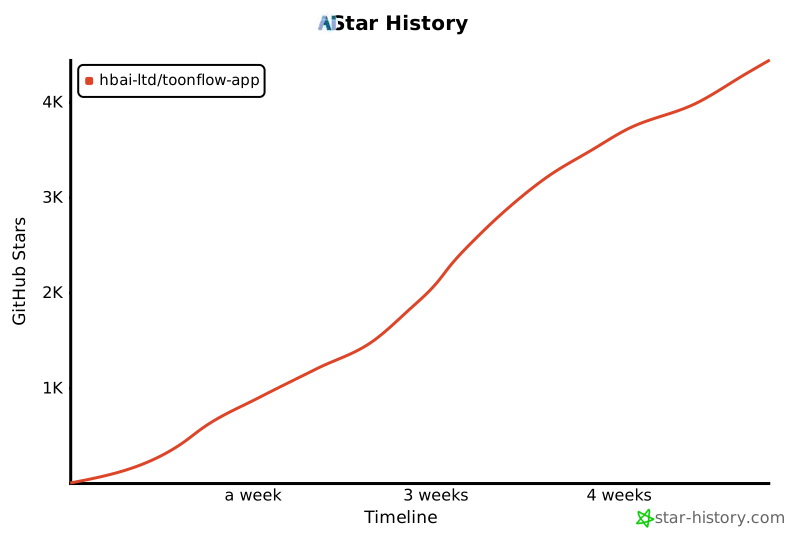](https://www.star-history.com/#HBAI-Ltd/Toonflow-app&type=timeline&legend=top-left)
|
||
|
||
---
|
||
|
||
|
||
# 🙏 謝辞
|
||
|
||
以下のオープンソースプロジェクトが Toonflow に強力なサポートを提供しています:
|
||
|
||
- [Express](https://expressjs.com/) - 高速でオープンな Node.js Web フレームワーク
|
||
- [AI SDK](https://ai-sdk.dev/) - TypeScript 向け AI ツールキット
|
||
- [Better-SQLite3](https://github.com/WiseLibs/better-sqlite3) - 高性能 SQLite3 バインディングライブラリ
|
||
- [Sharp](https://sharp.pixelplumbing.com/) - 高性能 Node.js 画像処理ライブラリ
|
||
- [Axios](https://axios-http.com/) - Promise ベースの HTTP クライアント
|
||
- [Zod](https://zod.dev/) - TypeScript ファーストのスキーマバリデーションライブラリ
|
||
- [Socket.IO](https://socket.io/) - リアルタイム双方向イベント通信エンジン
|
||
- [Electron](https://www.electronjs.org/) - クロスプラットフォームデスクトップアプリ開発フレームワーク
|
||
- [Hugging Face Transformers](https://huggingface.co/docs/transformers.js) - ローカル ML 推論ライブラリ
|
||
|
||
以下の組織・団体・個人が Toonflow をサポートしています:
|
||
|
||
<table>
|
||
<thead>
|
||
<tr>
|
||
<th align="center">ロゴ</th>
|
||
<th align="center">名称</th>
|
||
<th align="center">サポート方法</th>
|
||
<th>概要</th>
|
||
<th align="center">公式サイト</th>
|
||
</tr>
|
||
</thead>
|
||
<tbody>
|
||
<tr>
|
||
<td align="center"><img src="./sponsored/sophnet.png" alt="算能雲 ロゴ" width="48"></td>
|
||
<td align="center"><b>算能雲</b></td>
|
||
<td align="center">💻 計算リソーススポンサー</td>
|
||
<td>より速く、より安定し、より経済的なワンストップモデル推論APIサービスの提供を目指す</td>
|
||
<td align="center"><a href="https://www.sophnet.com/">公式サイト</a></td>
|
||
</tr>
|
||
<tr>
|
||
<td align="center"><img src="./sponsored/atlascloud.png" alt="Atlas Cloud ロゴ" width="48"></td>
|
||
<td align="center"><b>Atlas Cloud</b></td>
|
||
<td align="center">💻 計算リソーススポンサー</td>
|
||
<td>世界初の全モーダル推論プラットフォーム。対話、画像、動画、音声—すべて統一API。300以上のモデル、OpenAI互換。</td>
|
||
<td align="center"><a href="https://www.atlascloud.ai/">公式サイト</a></td>
|
||
</tr>
|
||
<tr>
|
||
<td align="center"><img src="./sponsored/hunyuan.webp" alt="Tencent Hunyuan 3D ロゴ" width="48"></td>
|
||
<td align="center"><b>Tencent Hunyuan 3D</b></td>
|
||
<td align="center">🌐 ワールドモデル技術サポート</td>
|
||
<td>Tencent Hunyuan 3D AI 創作エンジンは、Hunyuan 3D 生成大モデル v2.5 をベースにした、業界初のワンストップ3DコンテンツAI創作プラットフォーム。テキストからの3D生成、画像からの3D生成、3Dアニメーション生成、テクスチャ生成などをサポートし、スケッチからの3D生成、3Dキャラクター生成、ローポリゴンモデル生成に強み。</td>
|
||
<td align="center"><a href="https://3d.hunyuan.tencent.com/">公式サイト</a></td>
|
||
</tr>
|
||
</tbody>
|
||
</table>
|
||
|
||
完全なサードパーティ依存関係リストは `NOTICES.txt` を参照してください。
|
||
|
||
##### copyright © 北京愛阿科技有限公司
|
||
|
||
|
||
|
||
<img src="https://capsule-render.vercel.app/api?type=waving&color=gradient&customColorList=6,11,20&height=100§ion=footer" width="100%"/> |