mirror of
https://github.com/moeacgx/Telegram-Panel.git
synced 2026-05-14 11:02:12 +08:00

162 lines
7.7 KiB
Markdown
162 lines
7.7 KiB
Markdown
# Telegram Panel
|
|
|
|
[English](README.md) | [中文](README.zh-CN.md)
|
|
|
|
A multi-account Telegram management panel built on **WTelegramClient**, powered by **.NET 8** and **Blazor Server**.
|
|
|
|
<p align="center">
|
|
<img src="https://img.shields.io/badge/.NET-8.0-512BD4?style=for-the-badge&logo=dotnet&logoColor=white" alt=".NET 8.0">
|
|
<img src="https://img.shields.io/badge/Blazor-Server-512BD4?style=for-the-badge&logo=blazor&logoColor=white" alt="Blazor Server">
|
|
<img src="https://img.shields.io/badge/Docker-Compose-2496ED?style=for-the-badge&logo=docker&logoColor=white" alt="Docker Compose">
|
|
<img src="https://img.shields.io/badge/Powered%20by-WTelegramClient-333333?style=for-the-badge" alt="Powered by WTelegramClient">
|
|
</p>
|
|
|
|
<p align="center">
|
|
📚 <b><a href="https://moeacgx.github.io/Telegram-Panel/">Documentation</a></b> |
|
|
🏪 <b><a href="https://faka.boxmoe.eu.org/">API Account Marketplace</a></b> |
|
|
🖼️ <b><a href="screenshot/">Screenshots</a></b> |
|
|
💬 <b><a href="https://t.me/zhanzhangck">Telegram Channel</a></b> |
|
|
👥 <b><a href="https://t.me/vpsbbq">Community Group</a></b>
|
|
</p>
|
|
|
|
## Overview
|
|
|
|
Telegram Panel is designed for operating and managing multiple Telegram accounts from a single web interface. It focuses on account lifecycle management, batch operations, channel/group administration, automation workflows, and extensibility.
|
|
|
|
## Feature Highlights
|
|
|
|
- 📥 **Multi-account import and login**: import/export Telethon and TData archives, sign in with SMS verification codes, and handle 2FA passwords
|
|
- 👥 **Batch operations for account fleets**: bulk join / subscribe / leave / start bots, auto-send messages in private groups for account warming, bulk invite members or bots, batch assign administrators, export links, and more
|
|
- 📱 **Kick other devices with one click**: keep the current panel session while removing other active sessions
|
|
- 🧹 **Invalid account detection and cleanup**: batch-handle banned, limited, frozen, logged-out, or expired-session accounts
|
|
- 🔐 **2FA management**: change secondary passwords individually or in bulk, and bind / replace recovery email addresses (including support for Cloud Mail verification flows)
|
|
- 👤 **Better account visibility**: quickly inspect joined channels and groups from the account list, and display estimated registration time based on the 777000 system notification history
|
|
- 🧩 **Modular architecture**: install extensions for tasks, APIs, and UI modules (see `docs/developer/modules.md`)
|
|
|
|
## Recent Additions
|
|
|
|
- 🧠 **AI verification support**: long-running activity tasks can detect verification prompts and automatically click buttons or answer with text
|
|
- ⚙️ **Expanded AI configuration**: OpenAI-compatible endpoints, API key management, default / preset models, and one-click connectivity testing
|
|
- 🔁 **Improved AI reliability**: configurable retry counts with shared logic for AI decisions, answers, and connectivity tests
|
|
- 📚 **Data dictionary support**: text dictionaries, image dictionaries, and template variables
|
|
- 🕒 **Scheduled task capability**: timed channel and group tasks such as creation and publishing
|
|
- 🧠 **Task center upgrades**: pause, edit, and rerun continuous tasks; separate running tasks from history; support auto-cleanup
|
|
- 💬 **Continuous activity improvements**: account categories, randomized copywriting, second-level send intervals, and persistent run configuration
|
|
- 🔄 **Sync experience optimization**: manual “sync now” runs in the background and can be tracked in the task center
|
|
- 👤 **Account list enhancement**: estimated registration time display and joined channel/group inspection
|
|
- 📺 **Channel management upgrade**: channel lists now focus on joined channels, with multi-condition filters and linked-account visibility
|
|
- 👥 **Group management completion**: group creation, categorization, batch operations, and listing support
|
|
- 🔗 **Multi-account relationship visibility**: channels and groups can bind multiple system accounts, with linkage visible in list and detail views
|
|
- 🚪 **Real exit / dissolve actions**: channels and groups support single and batch leave / dissolve operations
|
|
- 🧹 **Data accuracy fixes**: improved channel-group separation and better presentation after relationship sync
|
|
- ♻️ **Post-sync cleanup**: automatically remove invalid relations and orphaned records after synchronization
|
|
- ⚡ **Data-layer optimization**: extra query and relation indexes for better filtering performance with large account / channel / group datasets
|
|
|
|
## Roadmap
|
|
|
|
- [x] One-click leave / unsubscribe / subscribe for channels and groups
|
|
- [x] Batch auto check-in
|
|
- [ ] One-click clear contacts
|
|
- [ ] Batch re-login with SMS verification codes (for refreshing sessions)
|
|
- [ ] Phone registration flow for unregistered numbers (name / optional email / email code, etc.)
|
|
- [ ] Generic SMS receiving API abstraction: the core app depends only on the abstraction, while providers integrate through adapter modules without changing the main codebase
|
|
- [ ] Support phone number replacement
|
|
- [ ] Multiple proxies: bind proxies by account category
|
|
- [ ] Multiple APIs: bind ApiId / ApiHash by account category
|
|
- [ ] Scheduled channel creation and scheduled public publishing
|
|
- [ ] Scheduled fan growth: integrate third-party fan-growth APIs through a generic adapter structure and provider modules
|
|
- [x] Scheduled speaking / warming for group chats
|
|
|
|
## Quick Start
|
|
|
|
### One-click Docker deployment (recommended)
|
|
|
|
Requirements: Docker. On Windows, Docker Desktop + WSL2 is recommended. On Linux, install Docker Engine directly.
|
|
|
|
#### 1. Prepare the project
|
|
|
|
```bash
|
|
git clone https://github.com/moeacgx/Telegram-Panel
|
|
cd Telegram-Panel
|
|
cp .env.example .env
|
|
```
|
|
|
|
#### 2. Choose an image tag
|
|
|
|
By default, the stable image is used and no change is required:
|
|
|
|
```bash
|
|
TP_IMAGE=ghcr.io/moeacgx/telegram-panel:latest
|
|
```
|
|
|
|
If you want the development image, update `.env` to:
|
|
|
|
```bash
|
|
TP_IMAGE=ghcr.io/moeacgx/telegram-panel:dev-latest
|
|
```
|
|
|
|
#### 3. Start the service
|
|
|
|
```bash
|
|
docker compose pull
|
|
docker compose up -d
|
|
```
|
|
|
|
Open: `http://localhost:5000`
|
|
|
|
#### Default admin account (first login)
|
|
|
|
Username: `admin`
|
|
Password: `admin123`
|
|
|
|
After signing in, change it on the password update page.
|
|
|
|
#### Common commands
|
|
|
|
```bash
|
|
# View logs
|
|
docker compose logs -f
|
|
|
|
# Update to the image tag specified in the current .env
|
|
docker compose pull
|
|
docker compose up -d
|
|
|
|
# Restart / stop
|
|
docker compose restart
|
|
docker compose down
|
|
```
|
|
|
|
### Run locally for development (optional)
|
|
|
|
> Suitable for development or local debugging. Requires the .NET 8 SDK.
|
|
|
|
```bash
|
|
dotnet run --project src/TelegramPanel.Web
|
|
```
|
|
|
|
Open: `http://localhost:5000`
|
|
|
|
## In-app Docker Update
|
|
|
|
The panel supports one-click self-update when deployed with Docker (top-left version number → version information dialog):
|
|
|
|
1. Click **Check for updates** to read the latest GitHub Release.
|
|
2. Click **Update and restart** to automatically download the matching Linux package to `/data/app-current`.
|
|
3. After restart is triggered, the container will prioritize launching from `/data/app-current`, so manual `docker compose pull` is not required.
|
|
|
|
Notes:
|
|
- This feature currently works only when running inside a Docker container.
|
|
- The updater depends on assets generated by the `release.yml` workflow. If a Release does not include `linux-x64` / `linux-arm64` zip assets, one-click update will be unavailable.
|
|
|
|
## Screenshots
|
|
|
|
More screenshots: `screenshot/`
|
|
|
|
| | | |
|
|
|---|---|---|
|
|
| <img src="screenshot/Dashboard.png" width="300" /> | <img src="screenshot/account.png" width="300" /> | <img src="screenshot/Import account.png" width="300" /> |
|
|
|
|
## ⭐ Star History
|
|
|
|
[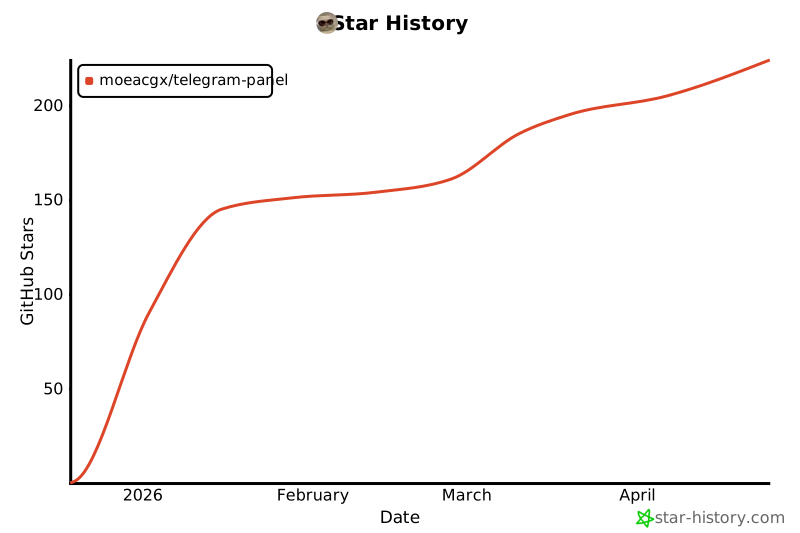](https://star-history.com/#moeacgx/Telegram-Panel&Date)
|