mirror of
https://github.com/xxnuo/MTranServer.git
synced 2026-09-03 06:35:20 +08:00

159 lines
10 KiB
Markdown
159 lines
10 KiB
Markdown
# MTranServer
|
||
|
||
[中文](README.md) | [English](docs/README_en.md) | [日本語](docs/README_ja.md) | [Français](docs/README_fr.md) | [Deutsch](docs/README_de.md)
|
||
|
||
<!-- <img src="./images/icon.png" width="64px" height="64px" align="right" alt="MTran"> -->
|
||
|
||
一个超低资源消耗速度超快的离线翻译模型服务器,无需显卡。单个请求平均响应时间 50 毫秒。支持全世界主要语言的翻译。
|
||
|
||
注意本模型服务器专注于`离线翻译`、`响应速度`、`跨平台部署`、`本地运行` 达到 `无限免费翻译` 的设计目标,受限于模型大小和优化程度,所以翻译质量肯定是不如大模型翻译的效果。需要高质量的翻译建议使用在线大模型 API。
|
||
|
||
> v4 优化了内存占用,速度进一步提升,增强了稳定性,如果你在使用旧版建议立即升级!
|
||
|
||
<img src="./images/preview.png" width="auto" height="460">
|
||
|
||
## 在线试用 Demo
|
||
|
||
| 网站 | TOKEN | 其他接口 | 提供者 |
|
||
| -------------------------------- | ------------------------- | ------------------------------------------------------------------------------ | ------- |
|
||
| `https://MTranServer.ipacel.cc/ui/?token=__IpacEL_MT_API_TOKEN__` | `__IpacEL_MT_API_TOKEN__` | 沉浸式翻译: `https://MTranServer.ipacel.cc/imme?token=__IpacEL_MT_API_TOKEN__` | [@ApliNi](https://github.com/ApliNi) |
|
||
|
||
感谢社区贡献者为用户提供试用服务!
|
||
|
||
## 使用说明
|
||
|
||
前往 [Releases](https://github.com/xxnuo/MTranServer/releases) 下载对应平台最新版本,直接在命令行启动程序,即可使用。
|
||
|
||
目前 [MTranServer](https://github.com/xxnuo/MTranServer) 主要是面向服务器使用环境,所以目前只有命令行服务和 Docker 部署。
|
||
|
||
有计划提供一个桌面端程序和浏览器插件方便使用,敬请期待。
|
||
|
||
> **重要提示:**
|
||
>
|
||
> 首次翻译某个语言对时,服务器会自动下载对应的翻译模型(除非启用了离线模式),这个过程可能需要等待一段时间(取决于网络速度和模型大小)。
|
||
> 模型下载完成后,翻译请求将享受毫秒级的响应速度。建议在正式使用前先测试一次翻译,让服务器预先下载和加载模型。
|
||
>
|
||
> 程序经常更新,如果遇到问题,可以尝试更新到最新版本。
|
||
|
||
服务器启动后日志会输出程序自带的一个简单 UI 的地址和在线调试文档的地址,下面是预览
|
||
|
||

|
||
|
||

|
||
|
||
|
||
### 命令行参数
|
||
|
||
```bash
|
||
./mtranserver [选项]
|
||
|
||
选项:
|
||
-version, -v 显示版本信息
|
||
-log-level string 日志级别 (debug, info, warn, error) (默认 "warn")
|
||
-config-dir string 配置目录 (默认 "~/.config/mtran/server")
|
||
-model-dir string 模型目录 (默认 "~/.config/mtran/models")
|
||
-host string 服务器监听地址 (默认 "0.0.0.0")
|
||
-port string 服务器端口 (默认 "8989")
|
||
-ui 启用 Web UI (默认 true)
|
||
-offline 启用离线模式,不自动下载新模型 (默认 false)
|
||
-worker-idle-timeout int Worker 空闲超时时间(秒) (默认 300)
|
||
--download pairs... 下载指定语言对的模型 (例如 --download en_zh zh_en)
|
||
--languages 列出所有支持下载的语言对
|
||
|
||
注意:`--download` 和 `--languages` 命令需要联网,无法在离线模式下工作。
|
||
|
||
示例:
|
||
./mtranserver --host 127.0.0.1 --port 8080
|
||
./mtranserver --ui --offline
|
||
./mtranserver -v
|
||
```
|
||
|
||
### Docker Compose 部署
|
||
|
||
找一个空目录,编写 `compose.yml` 文件,内容如下:
|
||
|
||
```yml
|
||
services:
|
||
mtranserver:
|
||
image: xxnuo/mtranserver:latest
|
||
container_name: mtranserver
|
||
restart: unless-stopped
|
||
ports:
|
||
- "8989:8989"
|
||
environment:
|
||
- MT_HOST=0.0.0.0
|
||
- MT_PORT=8989
|
||
- MT_ENABLE_UI=true
|
||
- MT_OFFLINE=false
|
||
# - MT_API_TOKEN=your_secret_token_here
|
||
volumes:
|
||
- ./models:/app/models
|
||
```
|
||
|
||
```bash
|
||
docker pull xxnuo/mtranserver:latest
|
||
docker compose up -d
|
||
```
|
||
|
||
#### 翻译插件兼容接口
|
||
|
||
服务器提供了多个翻译插件的兼容接口:
|
||
|
||
| 接口 | 方法 | 说明 | 支持的插件 |
|
||
| ------------------------------- | ---- | ---------------------------------- | --------------------------------------------------------------------------- |
|
||
| `/imme` | POST | 沉浸式翻译插件接口 | [沉浸式翻译](https://immersivetranslate.com/) |
|
||
| `/kiss` | POST | 简约翻译插件接口 | [简约翻译](https://github.com/fishjar/kiss-translator) |
|
||
| `/deepl` | POST | DeepL API v2 兼容接口 | 支持 DeepL API 的客户端 |
|
||
| `/google/language/translate/v2` | POST | Google Translate API v2 兼容接口 | 支持 Google Translate API 的客户端 |
|
||
| `/google/translate_a/single` | GET | Google translate_a/single 兼容接口 | 支持 Google 网页翻译的客户端 |
|
||
| `/hcfy` | POST | 划词翻译兼容接口 | [划词翻译](https://github.com/Selection-Translator/crx-selection-translate) |
|
||
|
||
**插件配置说明:**
|
||
|
||
> 注:
|
||
>
|
||
> - [沉浸式翻译](https://immersivetranslate.com/zh-Hans/docs/services/custom/) 在`设置`页面,开发者模式中启用`Beta`特性,即可在`翻译服务`中看到`自定义 API 设置`([官方图文教程](https://immersivetranslate.com/zh-Hans/docs/services/custom/))。然后将`自定义 API 设置`的`每秒最大请求数`拉高以充分发挥服务器性能准备体验飞一般的感觉。我设置的是`每秒最大请求数`为`512`,`每次请求最大段落数`为`1`。你可以根据自己服务器配置设置。
|
||
>
|
||
> - [简约翻译](https://github.com/fishjar/kiss-translator) 在`设置`页面,接口设置中滚动到下面,即可看到自定义接口 `Custom`。同理,设置`最大请求并发数量`、`每次请求间隔时间`以充分发挥服务器性能。我设置的是`最大请求并发数量`为`100`,`每次请求间隔时间`为`1`。你可以根据自己服务器配置设置。
|
||
>
|
||
> 接下来按下表的设置方法设置插件的自定义接口地址。
|
||
|
||
| 名称 | URL | 插件设置 |
|
||
| ---------------- | ---------------------------------------------------- | --------------------------------------------------------------- |
|
||
| 沉浸式翻译无密码 | `http://localhost:8989/imme` | `自定义API 设置` - `API URL` |
|
||
| 沉浸式翻译有密码 | `http://localhost:8989/imme?token=your_token` | 同上,需要更改 URL 尾部的 `your_token` 为你的 `MT_API_TOKEN` 值 |
|
||
| 简约翻译无密码 | `http://localhost:8989/kiss` | `接口设置` - `Custom` - `URL` |
|
||
| 简约翻译有密码 | `http://localhost:8989/kiss` | 同上,需要 `KEY` 填 `your_token` |
|
||
| DeepL 兼容 | `http://localhost:8989/deepl` | 使用 `DeepL-Auth-Key` 或 `Bearer` 认证 |
|
||
| Google 兼容 | `http://localhost:8989/google/language/translate/v2` | 使用 `key` 参数或 `Bearer` 认证 |
|
||
| 划词翻译 | `http://localhost:8989/hcfy` | 支持 `token` 参数或 `Bearer` 认证 |
|
||
|
||
**普通用户参照表格内容设置好插件使用的接口地址就可以使用了。**
|
||
|
||
## 同类项目
|
||
|
||
列出一些同类功能的项目,如果有其他需求的用户可以尝试这些项目:
|
||
|
||
| 项目名称 | 内存占用 | 并发性能 | 翻译效果 | 速度 | 其他信息 |
|
||
| ------------------------------------------------------------------ | -------- | -------- | -------- | ---- | --------------------------------------------------------------------------------------------------------------------------------- |
|
||
| [NLLB](https://github.com/facebookresearch/fairseq/tree/nllb) | 很高 | 差 | 一般 | 慢 | 大佬移植到了 Android 的 [RTranslator](https://github.com/niedev/RTranslator) 有很多优化,但占用仍然高,速度也不快 |
|
||
| [LibreTranslate](https://github.com/LibreTranslate/LibreTranslate) | 很高 | 一般 | 一般 | 中等 | 中端 CPU 每秒处理 3 句,高端 CPU 每秒处理 15-20 句,[详情](https://community.libretranslate.com/t/performance-benchmark-data/486) |
|
||
| [OPUS-MT](https://github.com/OpenNMT/CTranslate2#benchmarks) | 高 | 一般 | 略差 | 快 | [性能测试](https://github.com/OpenNMT/CTranslate2#benchmarks) |
|
||
| 其他大模型 | 超高 | 动态 | 非常好 | 很慢 | 对硬件要求很高,如果需要高并发翻译建议使用 vllm 框架,通过内存占用和显存占用来控制翻译并发量 |
|
||
| 本项目 | 低 | 高 | 一般 | 极快 | 单个请求平均响应时间 50ms |
|
||
|
||
> 表中为 CPU、英译中场景下的简单测试,非严格测试,非量化版本对比,仅供参考。
|
||
|
||
# 高级配置说明
|
||
|
||
请参考 [API.md](API.md) 文件和启动后的 API 文档。
|
||
|
||
## Star History
|
||
|
||
[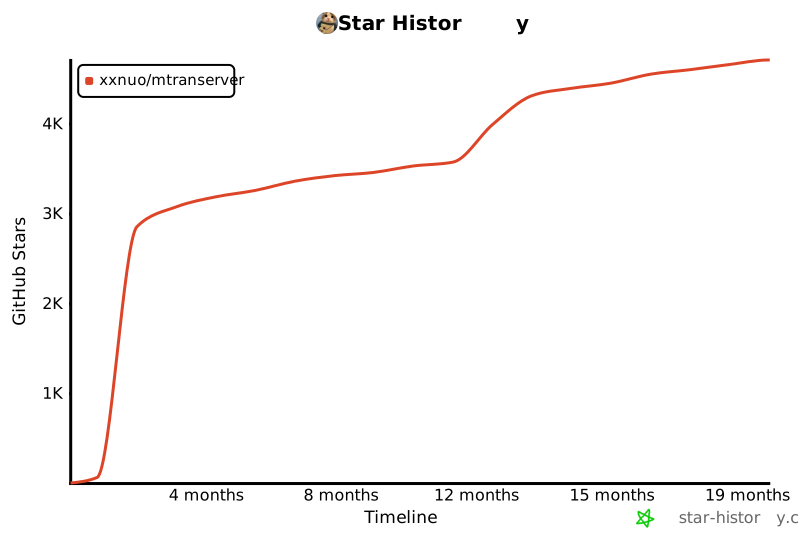](https://www.star-history.com/#xxnuo/MTranServer&Timeline)
|
||
|
||
## Thanks
|
||
|
||
[Bergamot Project](https://browser.mt/) for awesome idea of local translation.
|
||
|
||
[Mozilla](https://github.com/mozilla) for the [models](https://github.com/mozilla/firefox-translations-models). |