mirror of
https://github.com/supabase/supabase.git
synced 2026-07-04 18:34:26 +08:00

582 lines
17 KiB
Plaintext
582 lines
17 KiB
Plaintext
---
|
|
id: authsignal
|
|
title: 'Authsignal'
|
|
description: 'Add an MFA step after sign-in. Use Supabase Auth to sign in with email and password and Authsignal to initiate an Authenticator App challenge.'
|
|
---
|
|
|
|
This guide shows how to integrate [Authsignal](https://www.authsignal.com/) with [Next.js](https://nextjs.org/) and [Supabase](https://supabase.com/) in order to add an MFA step after sign-in.
|
|
|
|
The user flow is as follows:
|
|
|
|
1. The user enters their email and password to sign in
|
|
2. If the user has set up MFA, they're prompted to complete an MFA challenge (via Authenticator App) in order to complete sign-in
|
|
3. If the user has not set up MFA, they're signed in immediately and will see a button to set up MFA
|
|
|
|
The approach uses a temporary encrypted cookie to ensure that the Supabase auth cookies (`access_token` and `refresh_token`) are only set if the MFA challenge was successful. Session data is encrypted using [@hapi/iron](https://hapi.dev/family/iron).
|
|
|
|
The full code version of this example can be found [here](https://github.com/authsignal/supabase-example).
|
|
|
|
A live demo can be found [here](https://authsignal-supabase-example.vercel.app).
|
|
|
|
## How it works
|
|
|
|
1. A sign-in form posts email and password to the Next.js API route `/api/sign-in`
|
|
2. The `signIn` API route calls the Supabase client's `signInWithEmail` method and gets back a session object
|
|
3. The `signIn` API route then calls the Authsignal client's `track` method to determine if an MFA challenge is required
|
|
4. If a challenge is required, the `signIn` API route saves the session object in a temporary encrypted cookie and redirects to Authsignal
|
|
5. Once the challenge is completed, Authsignal redirects back to `/api/callback` which retrieves the session and sets the Supabase auth cookies
|
|
6. The `callback` API route then redirects to the index page which is protected with Supabase's `withPageAuth` wrapper around `getServerSideProps`
|
|
|
|
## Step 1: Configuring an Authsignal tenant
|
|
|
|
Go to the [Authsignal Portal](https://portal.authsignal.com) and create a new project and tenant.
|
|
|
|
You will also need to [enable at least one authenticator for your tenant](https://portal.authsignal.com/organisations/tenants/authenticators) - for example Authenticator Apps.
|
|
|
|
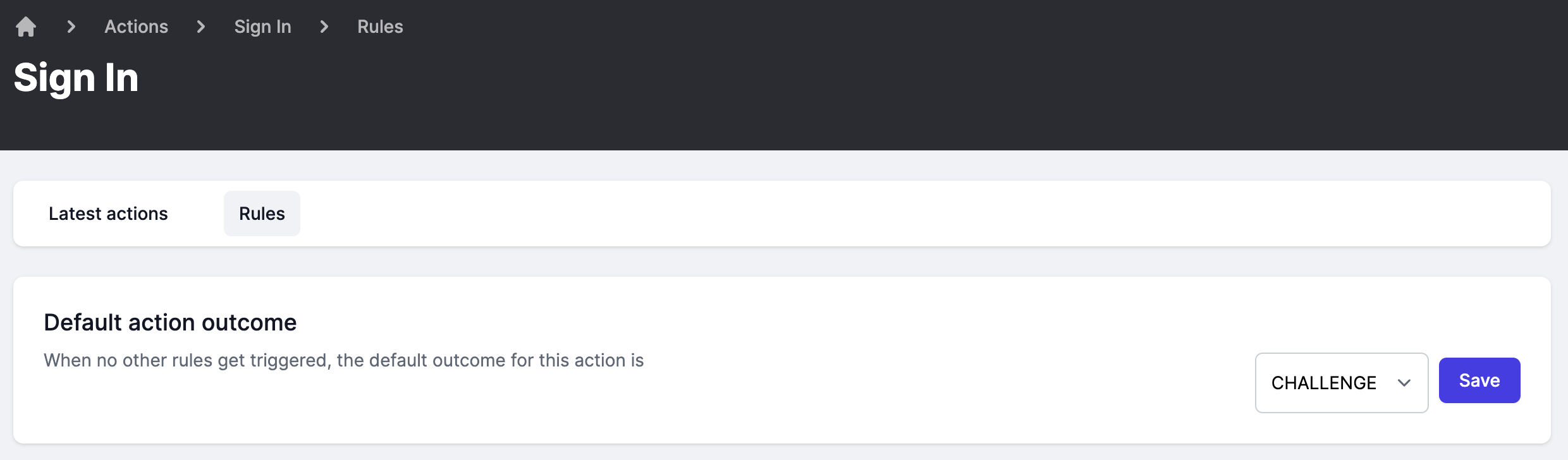
Finally, to configure the sign-in action to always challenge, go [here](https://portal.authsignal.com/actions/signIn/rules) and set the default action outcome to `CHALLENGE` and click save.
|
|
|
|
|
|
|
|
## Step 2: Creating a Supabase project
|
|
|
|
From your [Supabase dashboard](https://app.supabase.com/), click `New project`.
|
|
|
|
Enter a `Name` for your Supabase project and enter or generate a secure `Database Password`, then click `Create new project`.
|
|
|
|
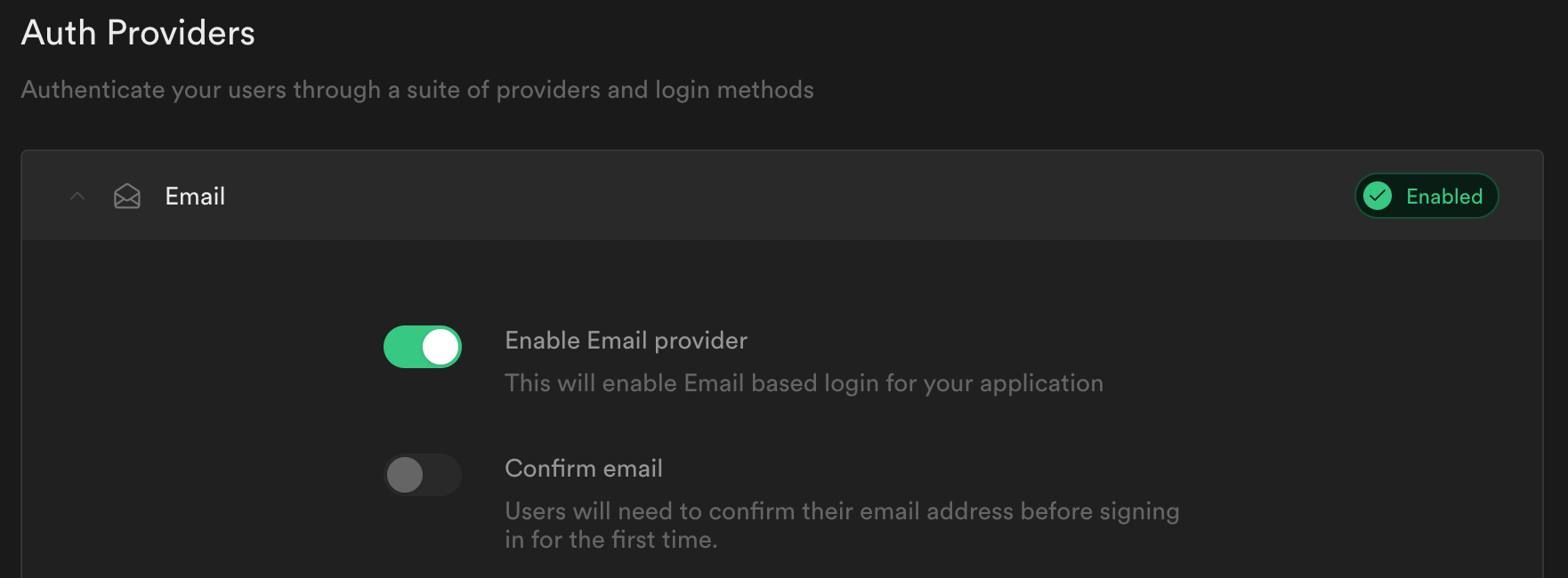
Once your project is created go to `Authentication -> Settings -> Auth Providers` and ensure `Enable Email provider` is checked and that `Confirm Email` is unchecked.
|
|
|
|
|
|
|
|
## Step 3: Building a Next.js app
|
|
|
|
Create a new Next.js project:
|
|
|
|
```bash
|
|
npx create-next-app --typescript supabase-authsignal-example
|
|
cd supabase-authsignal-example
|
|
```
|
|
|
|
Create a `.env.local` file and enter the following values:
|
|
|
|
```
|
|
NEXT_PUBLIC_SUPABASE_URL=get-from-supabase-dashboard
|
|
NEXT_PUBLIC_SUPABASE_ANON_KEY=get-from-supabase-dashboard
|
|
AUTHSIGNAL_SECRET=get-from-authsignal-dashboard
|
|
TEMP_TOKEN_SECRET=this-is-a-secret-value-with-at-least-32-characters
|
|
```
|
|
|
|
Supabase values can be found under `Settings > API` for your project.
|
|
|
|
Authsignal values can be found under `Settings > API Keys` for your tenant.
|
|
|
|
`TEMP_TOKEN_SECRET` is used to encrypt the temporary cookie. Set it to a random 32 character length string.
|
|
|
|
Restart your Next.js development server to read in the new values from `.env.local`.
|
|
|
|
```bash
|
|
npm run dev
|
|
```
|
|
|
|
## Step 4: Installing dependencies
|
|
|
|
Install the Supabase client and Auth helpers for Next.js:
|
|
|
|
```
|
|
npm install @supabase/supabase-js @supabase/auth-helpers-nextjs
|
|
```
|
|
|
|
Install the Authsignal Node.js client:
|
|
|
|
```
|
|
npm install @authsignal/node
|
|
```
|
|
|
|
Finally install 2 packages to help encrypt and serialize session data in cookies:
|
|
|
|
```
|
|
npm install @hapi/iron cookie
|
|
npm install --save-dev @types/cookie
|
|
```
|
|
|
|
## Step 5: Initializing the Authsignal client
|
|
|
|
Add the following code to `/lib/authsignal.ts`:
|
|
|
|
```
|
|
import { Authsignal } from "@authsignal/node";
|
|
|
|
const secret = process.env.AUTHSIGNAL_SECRET;
|
|
|
|
if (!secret) {
|
|
throw new Error("AUTHSIGNAL_SECRET is undefined");
|
|
}
|
|
|
|
const redirectUrl = "http://localhost:3000/api/callback";
|
|
|
|
export const authsignal = new Authsignal({ secret, redirectUrl });
|
|
```
|
|
|
|
The `redirectUrl` here is a Next.js API route which Authsignal will redirect back to after an MFA challenge. We'll implement this below.
|
|
|
|
## Step 6: Managing session data in cookies
|
|
|
|
Next we will add some helper functions for managing cookies:
|
|
|
|
- `setTempCookie` encrypts and serializes the Supabase session data and sets it in a temporary cookie
|
|
- `getSessionFromTempCookie` decrypts and parses this session data back from the cookie
|
|
- `setAuthCookie` sets the Supabase auth cookies (`access_token` and `refresh_token`) and clears the temporary cookie
|
|
|
|
Add the following code to `/lib/cookies.ts`:
|
|
|
|
```
|
|
import Iron from "@hapi/iron";
|
|
import { Session } from "@supabase/supabase-js";
|
|
import { parse, serialize } from "cookie";
|
|
import { NextApiRequest, NextApiResponse } from "next";
|
|
|
|
export async function setTempCookie(session: Session, res: NextApiResponse) {
|
|
const token = await Iron.seal(session, TEMP_TOKEN_SECRET, Iron.defaults);
|
|
|
|
const cookie = serialize(TEMP_COOKIE, token, {
|
|
maxAge: session.expires_in,
|
|
httpOnly: true,
|
|
secure: process.env.NODE_ENV === "production",
|
|
path: "/",
|
|
sameSite: "lax",
|
|
});
|
|
|
|
res.setHeader("Set-Cookie", cookie);
|
|
}
|
|
|
|
export async function getSessionFromTempCookie(
|
|
req: NextApiRequest
|
|
): Promise<Session | undefined> {
|
|
const cookie = req.headers.cookie as string;
|
|
|
|
const cookies = parse(cookie ?? "");
|
|
|
|
const tempCookie = cookies[TEMP_COOKIE];
|
|
|
|
if (!tempCookie) {
|
|
return undefined;
|
|
}
|
|
|
|
const session = await Iron.unseal(
|
|
tempCookie,
|
|
TEMP_TOKEN_SECRET,
|
|
Iron.defaults
|
|
);
|
|
|
|
return session;
|
|
}
|
|
|
|
export function setAuthCookie(session: Session, res: NextApiResponse) {
|
|
const { access_token, refresh_token, expires_in } = session;
|
|
|
|
const authCookies = [
|
|
{ name: ACCESS_TOKEN_COOKIE, value: access_token },
|
|
refresh_token
|
|
? { name: REFRESH_TOKEN_COOKIE, value: refresh_token }
|
|
: undefined,
|
|
]
|
|
.filter(isDefined)
|
|
.map(({ name, value }) =>
|
|
serialize(name, value, {
|
|
maxAge: expires_in,
|
|
httpOnly: true,
|
|
secure: process.env.NODE_ENV === "production",
|
|
path: "/",
|
|
sameSite: "lax",
|
|
})
|
|
);
|
|
|
|
// Also clear the temp cookie
|
|
const updatedCookies = [
|
|
...authCookies,
|
|
serialize(TEMP_COOKIE, "", { maxAge: -1, path: "/" }),
|
|
];
|
|
|
|
res.setHeader("Set-Cookie", updatedCookies);
|
|
}
|
|
|
|
const isDefined = <T>(value: T | undefined): value is T => !!value;
|
|
|
|
const TEMP_TOKEN_SECRET = process.env.TEMP_TOKEN_SECRET!;
|
|
const TEMP_COOKIE = "as-mfa-cookie";
|
|
const ACCESS_TOKEN_COOKIE = "sb-access-token";
|
|
const REFRESH_TOKEN_COOKIE = "sb-refresh-token";
|
|
```
|
|
|
|
## Step 7: Building the UI
|
|
|
|
We will add some form components for signing in and signing up as well as a basic home page.
|
|
|
|
Add the following code to `/pages/sign-up.tsx`:
|
|
|
|
```
|
|
import Link from "next/link";
|
|
import { useRouter } from "next/router";
|
|
|
|
export default function SignUpPage() {
|
|
const router = useRouter();
|
|
|
|
return (
|
|
<main>
|
|
<form
|
|
onSubmit={async (e) => {
|
|
e.preventDefault();
|
|
|
|
const target = e.target as typeof e.target & {
|
|
email: { value: string };
|
|
password: { value: string };
|
|
};
|
|
|
|
const email = target.email.value;
|
|
const password = target.password.value;
|
|
|
|
await fetch("/api/sign-up", {
|
|
method: "POST",
|
|
headers: { "Content-Type": "application/json" },
|
|
body: JSON.stringify({ email, password }),
|
|
}).then((res) => res.json());
|
|
|
|
router.push("/");
|
|
}}
|
|
>
|
|
<label htmlFor="email">Email</label>
|
|
<input id="email" type="email" name="email" required />
|
|
<label htmlFor="password">Password</label>
|
|
<input id="password" type="password" name="password" required />
|
|
<button type="submit">Sign up</button>
|
|
</form>
|
|
<div>
|
|
{"Already have an account? "}
|
|
<Link href="sign-in">
|
|
<a>Sign in</a>
|
|
</Link>
|
|
</div>
|
|
</main>
|
|
);
|
|
}
|
|
```
|
|
|
|
Then add the following code to `/pages/sign-in.tsx`:
|
|
|
|
```
|
|
import Link from "next/link";
|
|
import { useRouter } from "next/router";
|
|
|
|
export default function SignInPage() {
|
|
const router = useRouter();
|
|
|
|
return (
|
|
<main>
|
|
<form
|
|
onSubmit={async (e) => {
|
|
e.preventDefault();
|
|
|
|
const target = e.target as typeof e.target & {
|
|
email: { value: string };
|
|
password: { value: string };
|
|
};
|
|
|
|
const email = target.email.value;
|
|
const password = target.password.value;
|
|
|
|
const { state, mfaUrl } = await fetch("/api/sign-in", {
|
|
method: "POST",
|
|
headers: { "Content-Type": "application/json" },
|
|
body: JSON.stringify({ email, password }),
|
|
}).then((res) => res.json());
|
|
|
|
if (state === "CHALLENGE_REQUIRED") {
|
|
window.location.href = mfaUrl;
|
|
} else {
|
|
router.push("/");
|
|
}
|
|
}}
|
|
>
|
|
<label htmlFor="email">Email</label>
|
|
<input id="email" type="email" name="email" required />
|
|
<label htmlFor="password">Password</label>
|
|
<input id="password" type="password" name="password" required />
|
|
<button type="submit">Sign in</button>
|
|
</form>
|
|
<div>
|
|
{"Don't have an account? "}
|
|
<Link href="sign-up">
|
|
<a>Sign up</a>
|
|
</Link>
|
|
</div>
|
|
</main>
|
|
);
|
|
}
|
|
```
|
|
|
|
Now we will use Supabase's `withPageAuth` wrapper around `getServerSideProps` to make the home page require authentication via SSR. Replace the existing code in `/pages/index.tsx` with the following:
|
|
|
|
```
|
|
import { getUser, User, withPageAuth } from "@supabase/auth-helpers-nextjs";
|
|
import { GetServerSideProps } from "next";
|
|
import { useRouter } from "next/router";
|
|
import { authsignal } from "../lib/authsignal";
|
|
|
|
interface Props {
|
|
user: User;
|
|
isEnrolled: boolean;
|
|
}
|
|
|
|
export const getServerSideProps: GetServerSideProps<Props> = withPageAuth({
|
|
redirectTo: "/sign-in",
|
|
async getServerSideProps(ctx) {
|
|
const { user } = await getUser(ctx);
|
|
|
|
const { isEnrolled } = await authsignal.getUser({userId: user.id});
|
|
|
|
return {
|
|
props: { user, isEnrolled },
|
|
};
|
|
},
|
|
});
|
|
|
|
export default function HomePage({ user, isEnrolled }: Props) {
|
|
const router = useRouter();
|
|
|
|
return (
|
|
<main>
|
|
<section>
|
|
<div> Signed in as: {user?.email}</div>
|
|
<button
|
|
onClick={async (e) => {
|
|
e.preventDefault();
|
|
|
|
const { mfaUrl } = await fetch("/api/mfa", {
|
|
method: "POST",
|
|
headers: { "Content-Type": "application/json" },
|
|
body: JSON.stringify({ isEnrolled }),
|
|
}).then((res) => res.json());
|
|
|
|
window.location.href = mfaUrl;
|
|
}}
|
|
>
|
|
{isEnrolled ? "Manage MFA settings" : "Set up MFA"}
|
|
</button>
|
|
<button onClick={() => router.push("/api/sign-out")}>Sign out</button>
|
|
</section>
|
|
</main>
|
|
);
|
|
}
|
|
```
|
|
|
|
Optional: To make things look a bit nicer, you can add the following to `/styles/globals.css`:
|
|
|
|
```
|
|
main {
|
|
min-height: 100vh;
|
|
display: flex;
|
|
flex: 1;
|
|
flex-direction: column;
|
|
justify-content: center;
|
|
align-items: center;
|
|
}
|
|
|
|
section,
|
|
form {
|
|
display: flex;
|
|
flex-direction: column;
|
|
min-width: 300px;
|
|
}
|
|
|
|
button {
|
|
cursor: pointer;
|
|
font-weight: 500;
|
|
line-height: 1;
|
|
border-radius: 6px;
|
|
border: none;
|
|
background-color: #24b47e;
|
|
color: #fff;
|
|
padding: 0 15px;
|
|
height: 40px;
|
|
margin: 10px 0;
|
|
transition: background-color 0.15s, color 0.15s;
|
|
}
|
|
|
|
input {
|
|
outline: none;
|
|
font-family: inherit;
|
|
font-weight: 400;
|
|
background-color: #fff;
|
|
border-radius: 6px;
|
|
color: #1d1d1d;
|
|
border: 1px solid #e8e8e8;
|
|
padding: 0 15px;
|
|
margin: 5px 0;
|
|
height: 40px;
|
|
}
|
|
|
|
a {
|
|
color: #24b47e;
|
|
cursor: pointer;
|
|
}
|
|
```
|
|
|
|
## Step 8: Adding the API routes
|
|
|
|
Now we'll replace the existing api routes in `/pages/api/` with 5 new routes:
|
|
|
|
- `/sign-in.ts`: handles signing in with Supabase and initiating the MFA challenge with Authsignal
|
|
- `/sign-up.ts`: handles signing up with Supabase
|
|
- `/sign-out.ts`: clears the Supabase auth cookies and signs the user out
|
|
- `/mfa.ts`: handles the user's attempt to set up MFA or to manage their existing MFA settings
|
|
- `/callback.ts`: handles completing the MFA challenge with Authsignal
|
|
|
|
Add the following code to `/pages/api/sign-in.ts`:
|
|
|
|
```
|
|
import { supabaseClient } from "@supabase/auth-helpers-nextjs";
|
|
import { NextApiRequest, NextApiResponse } from "next";
|
|
import { authsignal } from "../../lib/authsignal";
|
|
import { setAuthCookie, setTempCookie } from "../../lib/cookies";
|
|
|
|
export default async function signIn(
|
|
req: NextApiRequest,
|
|
res: NextApiResponse
|
|
) {
|
|
const { email, password } = req.body;
|
|
|
|
const { data, error } = await supabaseClient.auth.api.signInWithEmail(
|
|
email,
|
|
password
|
|
);
|
|
|
|
if (error || !data?.user) {
|
|
return res.send({ error });
|
|
}
|
|
|
|
const { state, url: mfaUrl } = await authsignal.track({
|
|
action: "signIn",
|
|
userId: data.user.id,
|
|
});
|
|
|
|
if (state === "CHALLENGE_REQUIRED") {
|
|
await setTempCookie(data, res);
|
|
} else {
|
|
setAuthCookie(data, res);
|
|
}
|
|
|
|
res.send({ state, mfaUrl });
|
|
}
|
|
```
|
|
|
|
Then to handle new sign-ups add the following to `/pages/api/sign-up.ts`:
|
|
|
|
```
|
|
import { supabaseClient } from "@supabase/auth-helpers-nextjs";
|
|
import { Session } from "@supabase/supabase-js";
|
|
import { NextApiRequest, NextApiResponse } from "next";
|
|
import { setAuthCookie } from "../../lib/cookies";
|
|
|
|
export default async function signUp(
|
|
req: NextApiRequest,
|
|
res: NextApiResponse
|
|
) {
|
|
const { email, password } = req.body;
|
|
|
|
const { data, error } = await supabaseClient.auth.api.signUpWithEmail(
|
|
email,
|
|
password
|
|
);
|
|
|
|
if (error || !isSession(data)) {
|
|
res.send({ error });
|
|
} else {
|
|
setAuthCookie(data, res);
|
|
res.send({ data });
|
|
}
|
|
}
|
|
|
|
const isSession = (data: any): data is Session => !!data?.access_token;
|
|
```
|
|
|
|
To clear the auth cookies on sign-out add the following to `/pages/api/sign-out.ts`:
|
|
|
|
```
|
|
import { supabaseClient } from "@supabase/auth-helpers-nextjs";
|
|
import { NextApiRequest, NextApiResponse } from "next";
|
|
|
|
export default async function signOut(
|
|
req: NextApiRequest,
|
|
res: NextApiResponse
|
|
) {
|
|
supabaseClient.auth.api.deleteAuthCookie(req, res, { redirectTo: "/sign-in" });
|
|
}
|
|
```
|
|
|
|
To handle the user's actions to set up MFA or manage their existing MFA settings, add the following to `/pages/api/mfa.ts`:
|
|
|
|
```
|
|
import { getUser, withApiAuth } from "@supabase/auth-helpers-nextjs";
|
|
import { NextApiRequest, NextApiResponse } from "next";
|
|
import { authsignal } from "../../lib/authsignal";
|
|
|
|
export default withApiAuth(async function mfa(
|
|
req: NextApiRequest,
|
|
res: NextApiResponse
|
|
) {
|
|
if (req.method !== "POST") {
|
|
return res.status(405).send({ message: "Only POST requests allowed" });
|
|
}
|
|
|
|
const { user } = await getUser({ req, res });
|
|
|
|
const { isEnrolled } = req.body;
|
|
|
|
const { url: mfaUrl } = await authsignal.track({
|
|
action: isEnrolled ? "manageSettings" : "enroll",
|
|
userId: user.id,
|
|
redirectToSettings: isEnrolled,
|
|
});
|
|
|
|
res.send({ mfaUrl });
|
|
});
|
|
```
|
|
Because the user should be authenticated with Supabase to set up or manage MFA, we can use Supabase's `withApiAuth` wrapper to protect this route.
|
|
|
|
The `redirectToSettings` param specifies whether the user should be redirected to the MFA page settings panel after a challenge, rather than redirecting them immediately back to the application.
|
|
|
|
Finally we need a route to handle the redirect back from Authsignal after an MFA challenge. Add the following to `/pages/api/callback.ts`:
|
|
|
|
```
|
|
import { NextApiRequest, NextApiResponse } from "next";
|
|
import { authsignal } from "../../lib/authsignal";
|
|
import { getSessionFromTempCookie, setAuthCookie } from "../../lib/cookies";
|
|
|
|
export default async function callback(
|
|
req: NextApiRequest,
|
|
res: NextApiResponse
|
|
) {
|
|
const token = req.query.token as string;
|
|
|
|
const { success } = await authsignal.validateChallenge({ token });
|
|
|
|
if (success) {
|
|
const session = await getSessionFromTempCookie(req);
|
|
|
|
if (session) {
|
|
setAuthCookie(session, res);
|
|
}
|
|
}
|
|
|
|
res.redirect("/");
|
|
}
|
|
```
|
|
|
|
That's it! You should now be able to sign up a new user and set up MFA.
|
|
|
|
Then if you sign out, you'll be prompted to complete an MFA challenge when signing back in again.
|
|
|
|
## Resources
|
|
|
|
- To learn more about Authsignal take a look at the [API Documentation](https://docs.authsignal.com/).
|
|
- You can customize the look and feel of the Authsignal Prebuilt MFA page [here](https://portal.authsignal.com/organisations/tenants/customizations).
|