
# React Native Todo List example in TypeScript without Expo
Requirements
- Install Java SDK - Amazon Corretto - 17.0.1
- Install Android Studio Latest and follow the instructions in this page with some changes (see point 3) - Android development environment section
- In SDK Platform Selection, choose 11 (api - 30) and not 10 (api -29).
- In SDK Tools Selection, choose 30.0.2 version
Setup & run locally
1. Create new project
Sign up to Supabase - https://app.supabase.io and create a new project. Wait for your database to start.
2. Run "Todo List" Quickstart
Once your database has started, run the "Todo List" quickstart. Inside of your project, enter the SQL editor tab and scroll down until you see TODO LIST: Build a basic todo list with Row Level Security.
3. Get the URL and Key
Go to the Project Settings (the cog icon), open the API tab, and find your API URL and anon key, you'll need these in the next step.
The anon key is your client-side API key. It allows "anonymous access" to your database, until the user has logged in. Once they have logged in, the keys will switch to the user's own login token. This enables row level security for your data. Read more about this below.
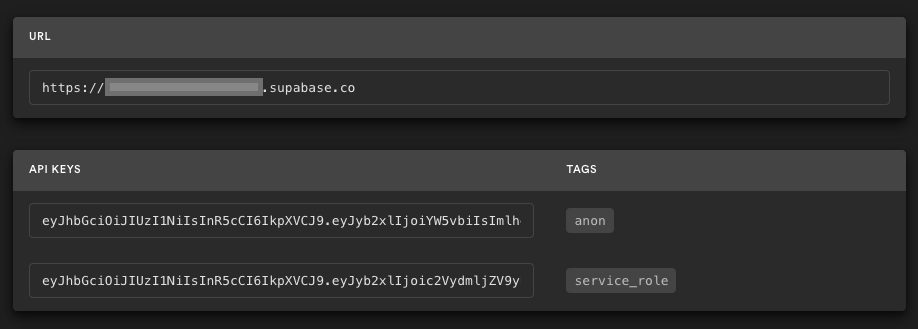
NOTE: The service_role key has full access to your data, bypassing any security policies. These keys have to be kept secret and are meant to be used in server environments and never on a client or browser.
Set the required environment variables:
cp .env.example .env
Set REACT_NATIVE_SUPABASE_URL and REACT_NATIVE_SUPABASE_ANON_KEY.
4. Install the dependencies & run the project:
Install the dependencies:
npm i
Run the project:
npm start
Supabase details
Postgres Row level security
This project uses very high-level Authorization using Postgres' Role Level Security.
When you start a Postgres database on Supabase, we populate it with an auth schema, and some helper functions.
When a user logs in, they are issued a JWT with the role authenticated and their UUID.
We can use these details to provide fine-grained control over what each user can and cannot do.
This is a trimmed-down schema, with the policies:
create table todos (
  id bigint generated by default as identity primary key,
  user_id uuid references auth.users not null,
  task text check (char_length(task) > 3),
  is_complete boolean default false,
  inserted_at timestamp with time zone default timezone('utc'::text, now()) not null
);

alter table todos enable row level security;

create policy "Individuals can create todos." on todos for
    insert with check (auth.uid() = user_id);

create policy "Individuals can view their own todos. " on todos for
    select using (auth.uid() = user_id);

create policy "Individuals can update their own todos." on todos for
    update using (auth.uid() = user_id);

create policy "Individuals can delete their own todos." on todos for
    delete using (auth.uid() = user_id);
Authors
Supabase is open source, we'd love for you to follow along and get involved at https://github.com/supabase/supabase