## Summary

- Renames the **Telemetry** nav section to **Monitoring and Debugging**
(nav label + sidebar title)
- Rewrites the section overview (`telemetry.mdx`) as a clean navigation
page using `ContentListings` — three panels (Debugging / Monitoring / AI
& automation) with no how-to prose
- Adds new `telemetry.data.ts` content-listings data file with three
groups registered in `index.ts`
- Adds a new **Debugging** guide (`debugging.mdx`) — request-stack
model, symptom-to-layer router with troubleshooting links for every
service, logging guidance
- Adds cross-links between `debugging.mdx`, `logs.mdx`, and
`advanced-log-filtering.mdx`
- Adds a new **AI agents and MCP** page (`ai-agents.mdx`) — MCP tools
table, `get_logs` usage, debugging skill workflow
- Restructures sidebar into three groups: **Debugging** / **Monitoring**
/ **AI & automation**

## Motivation

- No central entry point existed for debugging — content was scattered
across products with no index
- The overview page had almost no links for agents to follow
- The section name "Telemetry" caused confusion (also used for CLI usage
telemetry)
- Unblocks the `supabase` debugging skill, which routes agents to this
section as its source of truth

## Test plan

- [ ] `/docs/guides/telemetry` — three ContentListings panels render, no
prose how-to text
- [ ] `/docs/guides/telemetry.md` (markdown) — clean link list,
navigable by LLMs
- [ ] `/docs/guides/telemetry/debugging` — renders correctly, symptom
table links resolve
- [ ] `/docs/guides/telemetry/ai-agents` — new page renders correctly
- [ ] Sidebar shows 3 groups: Debugging / Monitoring / AI & automation
- [ ] All cross-links between debugging, logs, and
advanced-log-filtering resolve


<!-- This is an auto-generated comment: release notes by coderabbit.ai
-->
## Summary by CodeRabbit

## Summary

- **New Features**
- Added new documentation coverage for AI agent–assisted monitoring and
debugging, including an observability-driven troubleshooting workflow.

- **Documentation**
- Updated the “Telemetry” area to “Monitoring and Debugging” with a
refreshed landing page and reorganized sections (Debugging, Monitoring,
and AI).
- Revised the debugging and logs guides to improve step-by-step guidance
and highlight advanced log filtering.

- **Navigation**
- Renamed and restructured the top-level navigation entry to reflect the
new Monitoring and Debugging content layout.
<!-- end of auto-generated comment: release notes by coderabbit.ai -->

---------

Co-authored-by: Claude Sonnet 4.6 <noreply@anthropic.com>
Co-authored-by: Jeremias Menichelli <jmenichelli@gmail.com>
## I have read the
[CONTRIBUTING.md](https://github.com/supabase/supabase/blob/master/CONTRIBUTING.md)
file.
YES
## What kind of change does this PR introduce?
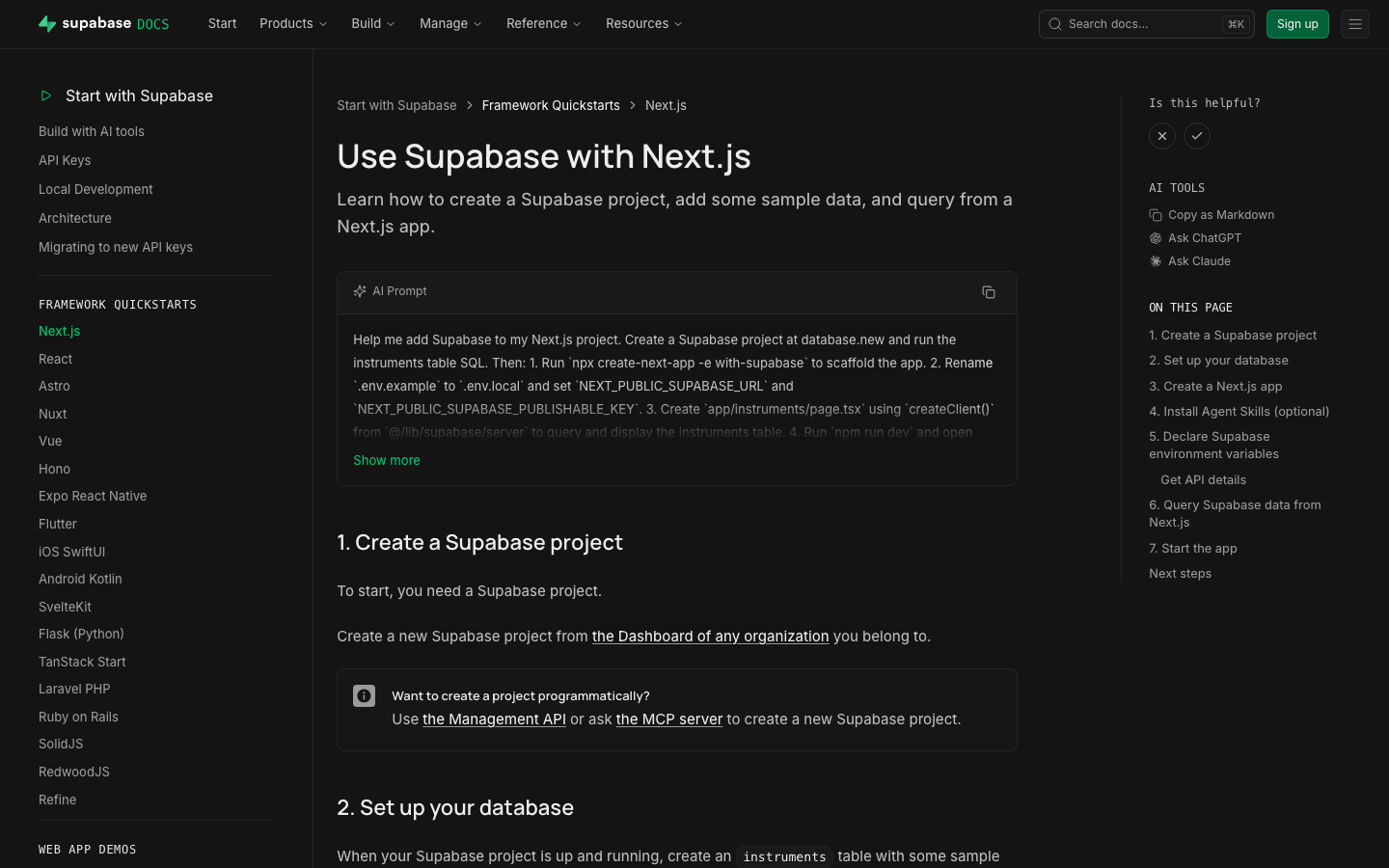
This PR reworks the `/guides/ai-tools` docs section to be agent-first.
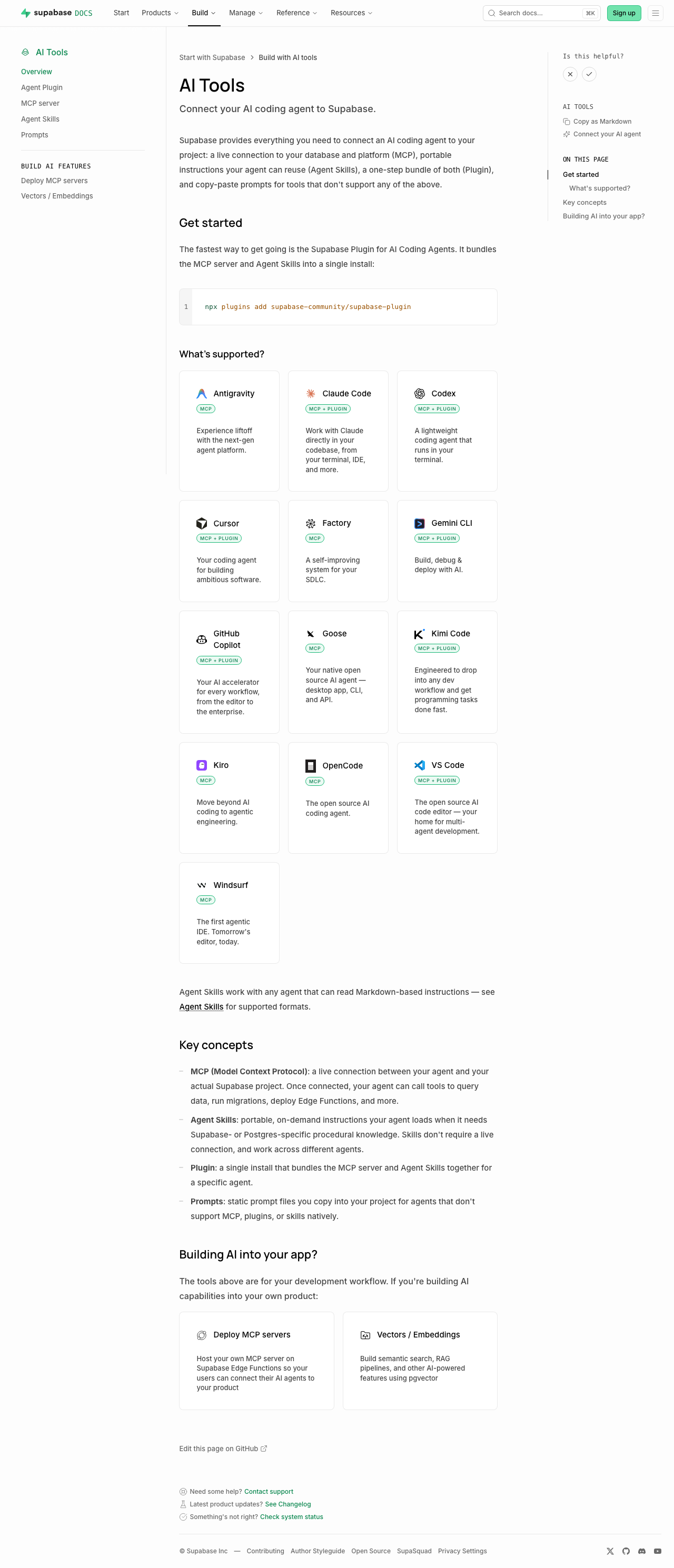
The overview now leads with the fastest path to a working setup (the
plugin install command), a "What's supported?" card grid showing which
coding agents and IDEs work via Plugin and/or MCP (with each product's
own tagline, not a generated sentence), and a concepts glossary —
instead of a plain four-item list. The sidebar "AI Tools" widget, shown
on every guides page, now links to this hub ("Connect your AI agent")
instead of opening a ChatGPT/Claude chat frontend.
Closes DOCS-1201.
## What is the current behavior?
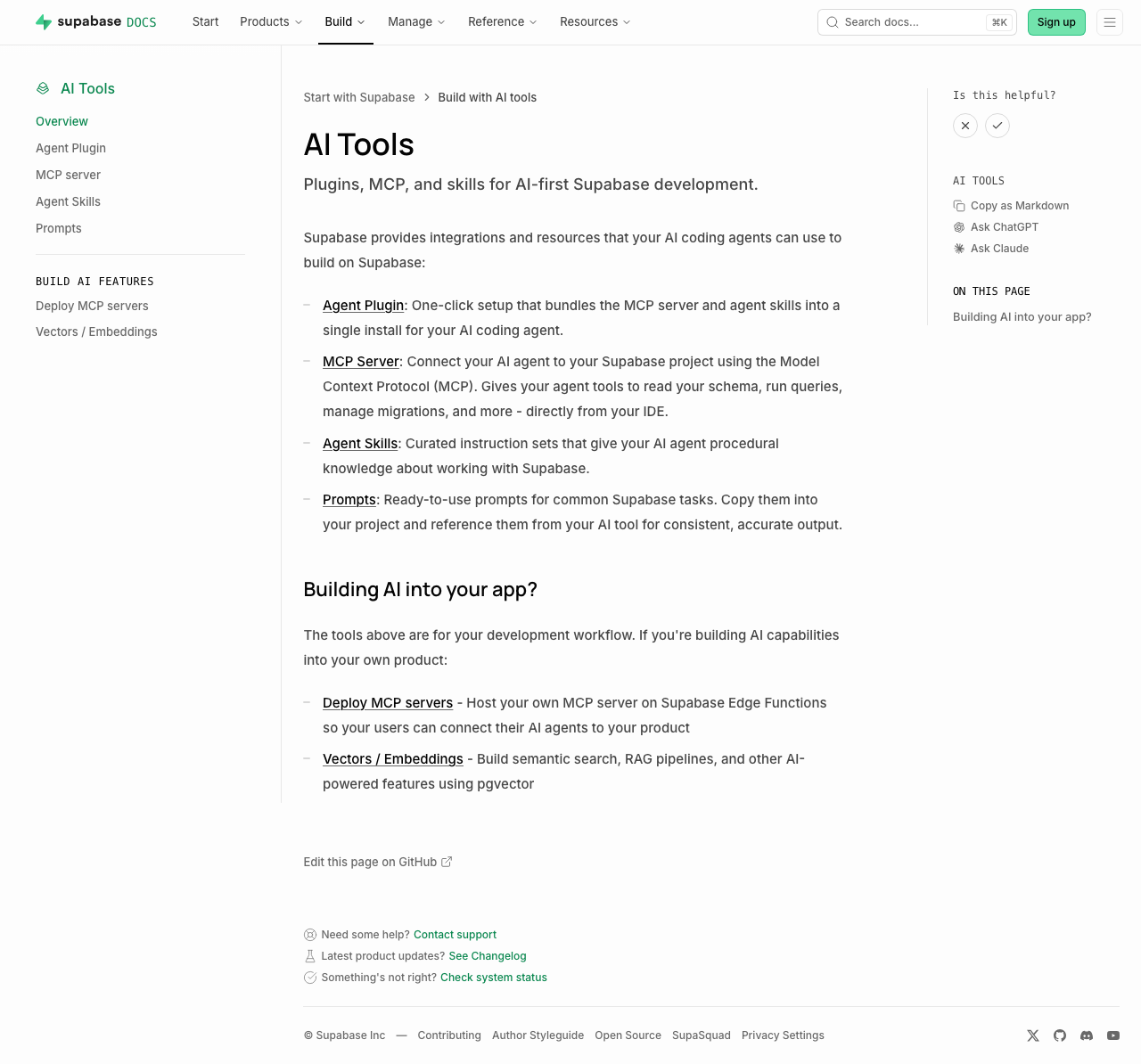
- The `/guides/ai-tools` overview is a plain four-item bullet list with
no getting-started path, compatibility info, or concepts explanation.
- The sidebar "AI Tools" widget offers "Copy as Markdown", "Ask
ChatGPT", and "Ask Claude" — the latter two send you to a chat frontend
instead of agent setup.
## What is the new behavior?
- `ai-tools.mdx`: intro → plugin install callout → "What's supported?"
card grid (`<ContentListings id="ai-tools-supported-agents" />`, icon +
tagline + Plugin/MCP badge per agent) → "Key concepts" glossary →
"Building AI into your app?" (also converted to `ContentListings`).
- New `data/content-listings/ai-tools.data.ts` builds the card grid from
the existing `PLUGIN_CLIENTS`/`MCP_CLIENT_DATA` client lists (no new
hand-maintained data) — fixing two latent bugs found along the way:
GitHub Copilot was keyed differently between the two sources (would have
produced duplicate cards), and Windsurf has no upstream docs URL (would
have been silently dropped).
- New opt-in `badgePosition` field on `ContentListingItem` so the badge
renders under the title for the agent grid, without changing the one
other existing badge usage (self-hosting's "Official" tag, still
inline).
- `plugins.mdx`/`mcp.mdx`/`ai-skills.mdx` each get a one-line "Quick
start" lead-in so they stand alone via the `.md` content-negotiation
route.
- `GuidesSidebar.tsx` + `telemetry-constants.ts`: Added "Connect your AI
agent" → `/guides/ai-tools`, and the `ask_ai_clicked` event with
`agent_setup_clicked`.
- Accessibility fix (from review): the "Not supported" indicator now
exposes an `sr-only` label instead of being fully `aria-hidden`.
## Additional context
- Worktree:
`~/GitHub/supabase/supabase-worktrees/nikrichers/docs-1201-make-guidesai-tools-agent-first-and-replace-chat-frontend`
- **Open question — Windsurf card**: `windsurf.com` now redirects to a
Devin Desktop page (Cognition acquired Windsurf in 2025), but Supabase's
own `MCP_CLIENT_DATA` still targets Windsurf's distinct config path
(`~/.codeium/windsurf/mcp_config.json`), so the card is still labeled
"Windsurf" with its pre-acquisition tagline ("The first agentic IDE.
Tomorrow's editor, today."). Needs a follow-up decision on whether to
relabel/merge/drop this card once Devin Desktop's MCP support (if any)
is confirmed.
- Follow-up (not in this PR): deeper IA rework of the ai-tools section
belongs to the broader agent-first audit;
`content/guides/resources/glossary.mdx` has no MCP/Agent
Skills/Plugin/Prompts entries yet — this PR's "Key concepts" is
currently the only definition of these terms site-wide.
- Verification:
| Check | Result |
| --- | --- |
| Lint (`lint:mdx`, `eslint`), `typecheck`, `test:local
lib/content-listings.test.ts` | Pass — 13/13 tests, 0 errors |
| `build:guides-markdown` | Pass — card grid flattens cleanly to
markdown |
| Playwright: broken icon requests, light + dark theme, PR preview |
Pass — 0 in either theme |
| `/guides/self-hosting` "Official" badge (existing `ContentListings`
usage) | Pass — unaffected by the new `badgePosition` opt-in |
### Before & After
#### [`/guides/ai-tools`](https://supabase.com/docs/guides/ai-tools)
Also shows the sidebar change (right rail): "Ask ChatGPT" / "Ask Claude"
→ "Connect your AI agent".
| [Before](https://supabase.com/docs/guides/ai-tools) |
[After](https://docs-git-nikrichers-docs-1201-make-guidesai-too-7c7493-supabase.vercel.app/docs/guides/ai-tools)
|
| --- | --- |
|
|
|
Sub-pages each just add a one-line "Quick start" callout under the intro
(no other layout change):
[plugins](https://supabase.com/docs/guides/ai-tools/plugins)
([preview](https://docs-git-nikrichers-docs-1201-make-guidesai-too-7c7493-supabase.vercel.app/docs/guides/ai-tools/plugins))
· [mcp](https://supabase.com/docs/guides/ai-tools/mcp)
([preview](https://docs-git-nikrichers-docs-1201-make-guidesai-too-7c7493-supabase.vercel.app/docs/guides/ai-tools/mcp))
· [ai-skills](https://supabase.com/docs/guides/ai-tools/ai-skills)
([preview](https://docs-git-nikrichers-docs-1201-make-guidesai-too-7c7493-supabase.vercel.app/docs/guides/ai-tools/ai-skills)).
### Test plan
- [x] `/guides/ai-tools` renders callout → card grid → concepts →
Building AI into your app, in order
- [x] Card grid: one card per agent (no duplicate Copilot), Windsurf
present, icons clean in both themes, taglines shown, badges below title
- [x] Sidebar shows "Connect your AI agent"; self-hosting's "Official"
badge unaffected
- [x] `.md` route still serves clean markdown; no lingering
`ask_ai_clicked`, ChatGPT/Claude icon, or `SupportedAgentsTable`
references
---------
Co-authored-by: Nik Richers <nik@validmind.ai>
## Summary

Brings the Log Drains docs up to the same standard as the Metrics API
page.

- Replaces the plain destination table with a visual
`LogDrainDestinationCards` component — a 3-column card grid
that mirrors the product UI destination picker. Cards link to anchors on
the same page (no sub-pages needed since
  setup is simpler than Metrics).
- Adds a "What you can do" intro section and a consistent "Required
configuration + Steps" structure for every
  destination.
- Adds two destinations that were missing from the docs entirely:
**Last9** and **Syslog** (both are live in the
product). Config fields sourced from `LogDrainDestinationSheetForm.tsx`.
  - Cleans up raw `<ul><li>` HTML to markdown lists.
- Adds an "Additional resources" footer (pricing, Metrics API, JS SDK
tracing).

  ## Files changed

- `apps/docs/content/guides/telemetry/log-drains.mdx` — core of the
changes
- `apps/docs/components/LogDrainDestinationCards.tsx` — new card grid
component
- `apps/docs/components/LogDrainDestinationCards.data.ts` — destination
data (9 entries)
- `apps/docs/internals/markdown-schema/LogDrainDestinationCards.ts` —
markdown fallback renderer
- `apps/docs/features/docs/MdxBase.shared.tsx` — register new component
- `apps/docs/internals/generate-guides-markdown.ts` — register new
component

## I have read the
[CONTRIBUTING.md](https://github.com/supabase/supabase/blob/master/CONTRIBUTING.md)
file.

YES

## What kind of change does this PR introduce?

docs update

## What is the current behavior?

not supanice, also missing syslog and last9

<img width="619" height="687" alt="image"
src="https://github.com/user-attachments/assets/58e8f07c-eb40-4d30-a5e2-3988d1af87c2"
/>

## What is the new behavior?

hopefully more supanice, also added syslog and last9

<img width="568" height="667" alt="image"
src="https://github.com/user-attachments/assets/be61e67f-58aa-4e8c-be0d-44206f1b16de"
/>


## Additional context


<!-- This is an auto-generated comment: release notes by coderabbit.ai
-->
## Summary by CodeRabbit

* **Documentation**
* Reorganized the Log Drains guide with destination-specific sections
and a new destination chooser.
  * Added support and setup guidance for Last9 and Syslog destinations.
* Clarified HTTP batching, JSON delivery, compression, authentication,
and endpoint requirements.
* Updated OpenTelemetry, Datadog, Loki, Amazon S3, Sentry, and Axiom
instructions.
* Added Edge Function examples covering compressed and uncompressed
payloads.
* Added links to pricing, Metrics API, and JavaScript tracing resources.

* **UI Improvements**
* Updated destination listings with clearer, consistent icons and
presentation.
<!-- end of auto-generated comment: release notes by coderabbit.ai -->

---------

Co-authored-by: github-actions[bot] <41898282+github-actions[bot]@users.noreply.github.com>
Co-authored-by: Nik Richers <nik@validmind.ai>
Adds a docs guide, "Choosing a server-side package", that explains when
to use `supabase-js`, `@supabase/ssr`, or `@supabase/server` when
working with Supabase from JavaScript on the server. It includes a
decision table and a short code example for each, with one rule up
front: cookie-based sessions in SSR frameworks use `@supabase/ssr`,
per-request header auth in Edge Functions and other backend runtimes
uses `@supabase/server`, and `supabase-js` is the base client both wrap.

The guide is surfaced from the Auth overview page and the sidebar, and
is cross-linked from the `supabase-js` and `@supabase/server` reference
introductions so it is reachable from where developers start. It also
states that the packages coexist and are not replacements for each
other, and keeps combining `@supabase/server` with `@supabase/ssr` as an
advanced section.

<!-- This is an auto-generated comment: release notes by coderabbit.ai
-->
## Summary by CodeRabbit

- **New Features**
- Added a guide explaining how to choose between Supabase server-side
JavaScript packages.
- Added the guide to Auth navigation and the getting-started content
listings.
- Added links to the new guidance throughout relevant JavaScript and
server documentation.
- **Documentation**
- Clarified when to use cookie-based sessions versus header-based
authentication.
- Added package comparisons, usage examples, advanced guidance, and
related next steps.
- Updated spelling support for framework names used in the
documentation.
<!-- end of auto-generated comment: release notes by coderabbit.ai -->

---------

Co-authored-by: github-actions[bot] <41898282+github-actions[bot]@users.noreply.github.com>
## I have read the
[CONTRIBUTING.md](https://github.com/supabase/supabase/blob/master/CONTRIBUTING.md)
file.

YES

## What kind of change does this PR introduce?

Bug fix + partial revert.

## What is the current behavior?

1. `ContentListings.client.tsx` unconditionally derives `hasLightIcon`
from `Boolean(item.icon)`. `GlassPanel` appends `-light.svg` to the icon
path in light mode whenever `hasLightIcon` is true. Framework icons
(react, nuxt, hono, redwood, flutter, swift, kotlin, svelte, solidjs,
vue, refine, angular, ionic) have no `-light.svg` variants, causing
broken image requests in light mode for any ContentListings card that
uses them.

2. `getting-started.mdx` uses `<ContentListings
id="getting-started-overview" />` (added in #47097) for the top
three-card grid (Build with AI tools, API Keys, Local Development).

## What is the new behavior?

1. `hasLightIcon` is now an optional field in the item schema (defaults
to `Boolean(item.icon)` for backward compatibility). The component reads
`item.hasLightIcon ?? Boolean(item.icon)`, so data files can opt
specific icons out of the light-mode variant.

2. `<ContentListings id="getting-started-overview" />` is removed and
the original hand-authored GlassPanel grid is restored. The
`gettingStartedGetStarted` data entry and its registry import are also
removed.

ContentListings has no mandate to cover every section of every page: the
goal was for hub and overview pages to have a reasonable, standardized
link section that tooling can lint for. This page doesn't fit that
pattern.

## Additional context

| Check | Result |
|-------|--------|
| `pnpm vitest run lib/content-listings.test.ts` | ✅ 12/12 passed |
| `pnpm lint:mdx` (getting-started.mdx) | ✅ No warnings |

<!-- This is an auto-generated comment: release notes by coderabbit.ai
-->
## Summary by CodeRabbit

* **New Features**
* Updated the Getting Started guide with dedicated tiles for Build with
AI Tools, API Keys, and Local Development.
  * Expanded the available Getting Started content listings.

* **Bug Fixes**
* Improved icon styling in content listings so light icon treatment
reflects each item’s configuration.
<!-- end of auto-generated comment: release notes by coderabbit.ai -->

---------

Co-authored-by: Nik Richers <nik@validmind.ai>
## I have read the
[CONTRIBUTING.md](https://github.com/supabase/supabase/blob/master/CONTRIBUTING.md)
file.
YES
## What kind of change does this PR introduce?
This PR converts link sections in the self-hosting overview page to the
`ContentListings` component, puts conceptual guidance before deployment
options, and adds badge support for the Docker card (minor).
Relates to DOCS-1137
## Current behavior
`self-hosting.mdx` uses hand-authored `<GlassPanel>` / `<Link>` JSX for
two sections:
- **Get started**: Docker card with a JSX title containing a `<Badge>`
element (was previously deferred for this reason).
- **Community-driven projects**: Two cards with trivial `<span>`-wrapped
string titles.
Get started and Community cards appear at the top of the page, before
the conceptual overview. The Support and community section uses
hand-authored bullet lists for GitHub, Discord, and Reddit links.
## New behavior
- The self-hosting overview page now uses data-driven `ContentListings`
instead of hand-written cards and bullet lists.
- Conceptual content (how self-hosting differs, your responsibilities,
telemetry) comes first; deployment options and community resources
follow.
- Section intro text lives in listing data rather than inline MDX.
- Brand icons added to all listing cards (Docker, Kubernetes, Traefik,
GitHub, Discord, Reddit).
- Minor: Added support for badges to content listings, such as
"Official" in the Docker tile
Data lives in `self-hosting.data.ts` (5 groups, 8 links) and is
registered in `content-listings/index.ts`.
## Additional context
### Icon usage rights
New brand icons (Kubernetes, Traefik, Reddit) are sourced from [Simple
Icons](https://simpleicons.org) (CC0 1.0). Existing icons (Docker,
GitHub, Discord) reuse assets already in `apps/docs/public/img/icons/`.
Use is non-commercial documentation only — consistent with existing docs
icon usage and trademark fair-use for identifying linked third-party
services.
### To do:
- [ ] Check with @aantti if he's on board with switching the page to
content listings we can lint for and the content restructure to match
other overview pages
## Verification
| Gate | Result |
|------|--------|
| `pnpm vitest run lib/content-listings.test.ts` | ✅ 12/12 passed |
| `pnpm build:guides-markdown` | ✅ 744 files generated |
| `pnpm lint:mdx` (self-hosting.mdx) | ✅ No warnings on changed file |
### Proof: restructured self-hosting page with ContentListings and icons
| [Before (production)](https://supabase.com/docs/guides/self-hosting) |
[After (PR
preview)](https://docs-git-nikrichers-docs-1137-self-hosting-supabase.vercel.app/docs/guides/self-hosting)
|
|---|---|
|

|

|
<!-- This is an auto-generated comment: release notes by coderabbit.ai
-->
## Summary by CodeRabbit
* **New Features**
* Updated the self-hosting guide to use dynamic content listings for
“Get started,” community resources, support options, and sharing
experiences.
* Added richer listing cards with optional badges and improved icon
handling.
* Expanded self-hosting resource groups to surface more relevant links
in docs navigation.
<!-- end of auto-generated comment: release notes by coderabbit.ai -->
---------
Co-authored-by: Nik Richers <nik@validmind.ai>
## I have read the CONTRIBUTING.md file.
YES
## What kind of change does this PR introduce?
This PR helps standardise link sections which is useful for overview
pages that frequently use similar sections such as "Next steps", "Get
started", or "Examples".
Six high-traffic overview pages are migrated as a pilot, with a skill in
the new
[supabase/docs-agent-skills](https://github.com/supabase/docs-agent-skills)
repo to audit and convert the rest in a follow-on PR.
Refactored from an initial YAML front matter approach per review
feedback from @jeremenichelli. Now implemented as a React component and
using existing linting & Markdown export functionality.
A second round of review feedback further simplified the architecture:
the per-listing component registry was removed in favor of a single
`<ContentListings id="..." />` component backed by an ID-keyed data
lookup, the listing data moved out of `apps/docs/components/` into
`apps/docs/data/content-listings/`, the listing-specific link wrapper
was replaced with the existing `<Link>` + `<GlassPanel>` pattern from
the rest of the docs, and the headings now defer to the shared
`<Heading>` from `MdxBase.shared.tsx` (no parallel marker-to-tag
mapping, no typography overrides). Great feedback, thank you! 🙏
Relates to DOCS-1032.
## What is the current behavior?
Authors implement these sections however they wish. As a result,
overview and index pages use inconsistent patterns for orientation
links: some use hand-rolled Markdown lists, some use custom panel/grid
components, some use buttons, and some have no guidance about where to
go next at all. There is no shared component for these sections and no
analytics on those clicks.
## What is the new behavior?
Authors add orientation sections in two steps:
1. Define listing data in a `.data.ts` file under
`apps/docs/data/content-listings/` (for example, `storage.data.ts`).
Each `ContentListingGroup` has a globally-unique `id` like
`storage-get-started`.
2. Place a single `<ContentListings id="..." />` component inline in
guide MDX.
The ID is also the telemetry `listingId`, so the same value
disambiguates the section in PostHog dashboards.
Grid and list layouts, optional icons (such as
`/docs/img/icons/github-icon` with `-light.svg` variants for dark mode),
and external URLs are supported. Conditionals that use `$Show` around
inline components are also supported, for example for auth pricing.
### Usage example from "Storage" overview page
`apps/docs/data/content-listings/storage.data.ts`:
```ts
export const storageGetStarted: ContentListingGroup = {
id: 'storage-get-started',
heading: 'Get started',
description: 'Choose the bucket type that fits your use case:',
type: 'grid',
items: [
{
title: 'Files buckets',
href: '/guides/storage/quickstart',
description:
'Store and serve images, videos, documents, and general-purpose files with direct URL access and row-level security.',
},
{
title: 'Analytics buckets',
href: '/guides/storage/analytics/introduction',
description:
'Store data in Apache Iceberg tables for data lakes, logs, and ETL. Query from Postgres via foreign tables with partitioning.',
},
{
title: 'Vector buckets',
href: '/guides/storage/vector/introduction',
description:
'Store embeddings and run similarity search for semantic matching, AI, and RAG. Use HNSW indexing, distance metrics, and metadata filtering.',
},
],
}
```
`apps/docs/content/guides/storage.mdx`:
```mdx
<ContentListings id="storage-get-started" />
```
Renders as:
<img width="689" alt="Storage Get started listing — Files, Analytics,
and Vector buckets"
src="https://github.com/user-attachments/assets/0d1b9531-962f-40ae-891e-b1e93ff1c939"
/>
<br>Exported in Markdown as:
```md
## Get started
Choose the bucket type that fits your use case:
- **[Files buckets](/docs/guides/storage/quickstart):** Store and serve images, videos, documents, and general-purpose files with direct URL access and row-level security.
- **[Analytics buckets](/docs/guides/storage/analytics/introduction):** Store data in Apache Iceberg tables for data lakes, logs, and ETL. Query from Postgres via foreign tables with partitioning.
- **[Vector buckets](/docs/guides/storage/vector/introduction):** Store embeddings and run similarity search for semantic matching, AI, and RAG. Use HNSW indexing, distance metrics, and metadata filtering.
```
Click tracking fires via PostHog (`docs_content_listing_clicked`):
```json
{
"action": "docs_content_listing_clicked",
"custom_properties": {
"targetPath": "/guides/storage/quickstart",
"linkTitle": "Files buckets",
"groupTitle": "Get started",
"listingId": "storage-get-started"
}
}
```
Still finding my way around PostHog, but I verified on preview deploy
that clicking a content listing on `/docs/guides/auth` sends
`docs_content_listing_clicked` to
`https://api.supabase.green/platform/telemetry/event` and receives HTTP
201.
### Authoring experience
Three ways to add or convert content listings: copy the agent prompt
first, use snippets for manual edits, or invoke the audit skill for
batch follow-on work. Refer to `CONTRIBUTING.md` for the full authoring
guide.
#### 1. Agent prompt
Copy into Cursor or another AI assistant:
```text
Add a content listing block for [TOPIC] / [SECTION] (for example, Storage / Examples).
Follow CONTRIBUTING § Content listings in apps/docs.
- Add data to apps/docs/data/content-listings/[topic].data.ts
- Use a globally-unique kebab-case id like `[topic]-[section]`
- Place inline in the guide MDX with <ContentListings id="..." />
- Copy structure from storageGetStarted in apps/docs/data/content-listings/storage.data.ts
- Run pnpm test:local lib/content-listings.test.ts from apps/docs
```
#### 2. VS Code / Cursor snippets
Type these prefixes in the docs workspace
(`.vscode/content-listing.code-snippets`):
| Prefix | Inserts |
| ----------- | --------------------------------------------------------
|
| `cl-data` | `ContentListingGroup` export skeleton with namespaced id |
| `cl-inline` | `<ContentListings id="…" />` in guide MDX |
<img width="658" height="274" alt="image"
src="https://github.com/user-attachments/assets/5ef20954-7aee-4925-887d-79a5ae766b37"
/>
#### 3. Batch audit skill
For follow-on overview page conversion or maintenance, use the
[`audit-content-listings`](https://github.com/supabase/docs-agent-skills/blob/main/.claude/skills/audit-content-listings/SKILL.md)
skill in `docs-agent-skills` (skill, `conversion-manifest.json`, and
validation script).
Example:
```text
Use audit-content-listings. Audit getting-started.mdx, update conversion-manifest.json, then convert the next unconverted section only.
```
## Additional context
The implementation includes a presentational `<ContentListings />`
component (grid/list layouts, GlassPanel, telemetry) backed by ID-keyed
data modules, and a single markdown export handler that reads the same
`id` prop from the JSX and looks up data via the shared registry.
Key files:
- **Data:** `apps/docs/data/content-listings/` (one `.data.ts` file per
guide topic, plus `index.ts` exporting `CONTENT_LISTINGS` and
`getContentListingById`)
- **Renderer:** `apps/docs/components/ContentListings/` (single
`<ContentListings id="…" />` component); registered in
`apps/docs/features/docs/MdxBase.shared.tsx`
- **Types/helpers:** `apps/docs/lib/content-listings.schema.ts` (zod
schemas, type aliases, grid/heading/href helpers)
- **Markdown export:** `apps/docs/internals/markdown-schema/Listings.ts`
(single ID-driven handler) wired into
`apps/docs/internals/generate-guides-markdown.ts`
- **Telemetry:** `docs_content_listing_clicked` defined in
`packages/common/telemetry-constants.ts`, fired from
`ContentListings.client.tsx`
- **Authoring guide:** `apps/docs/CONTRIBUTING.md` (Components and
elements → Content listings)
- **VS Code snippets:** `.vscode/content-listing.code-snippets`
(`cl-data`, `cl-inline`)
### Before & After
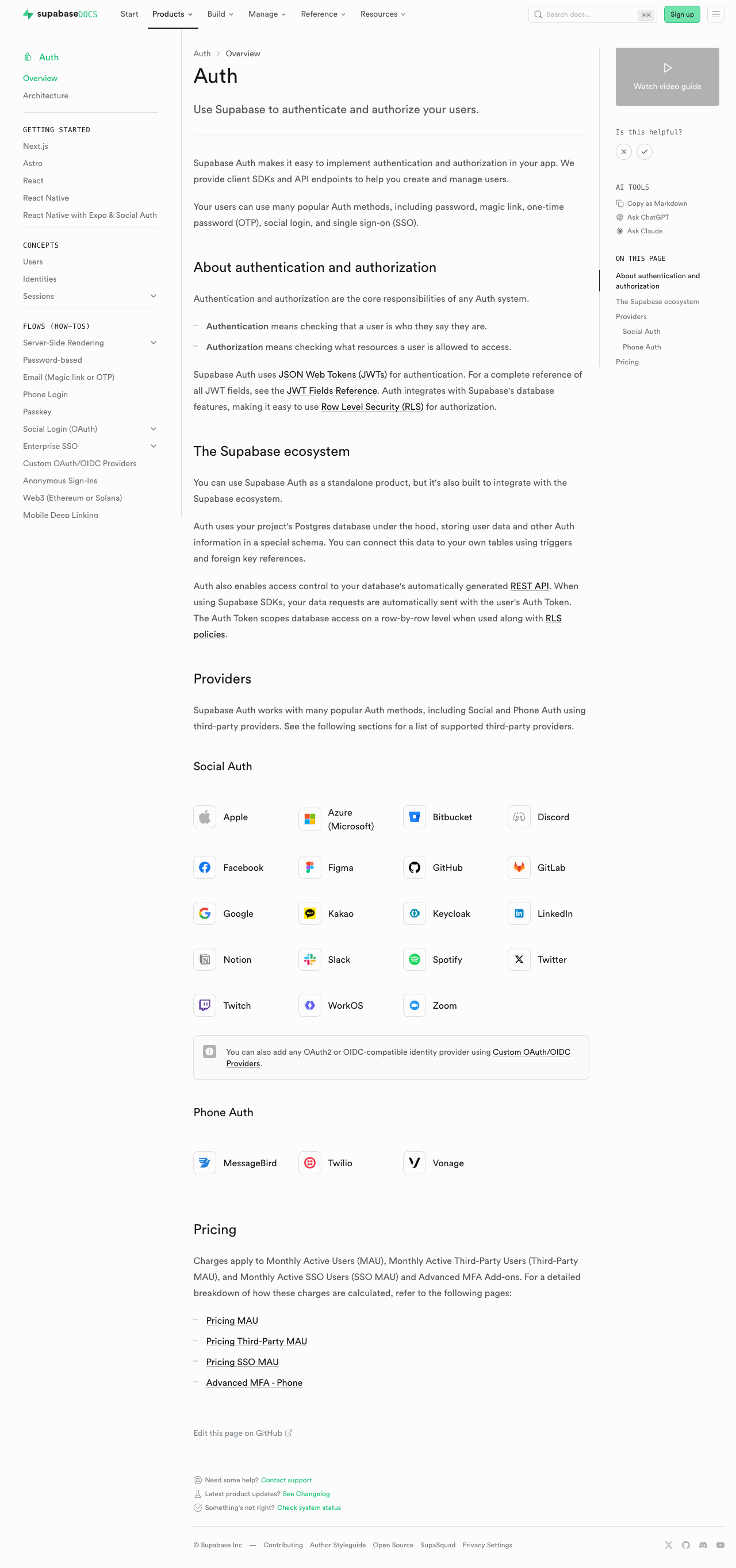
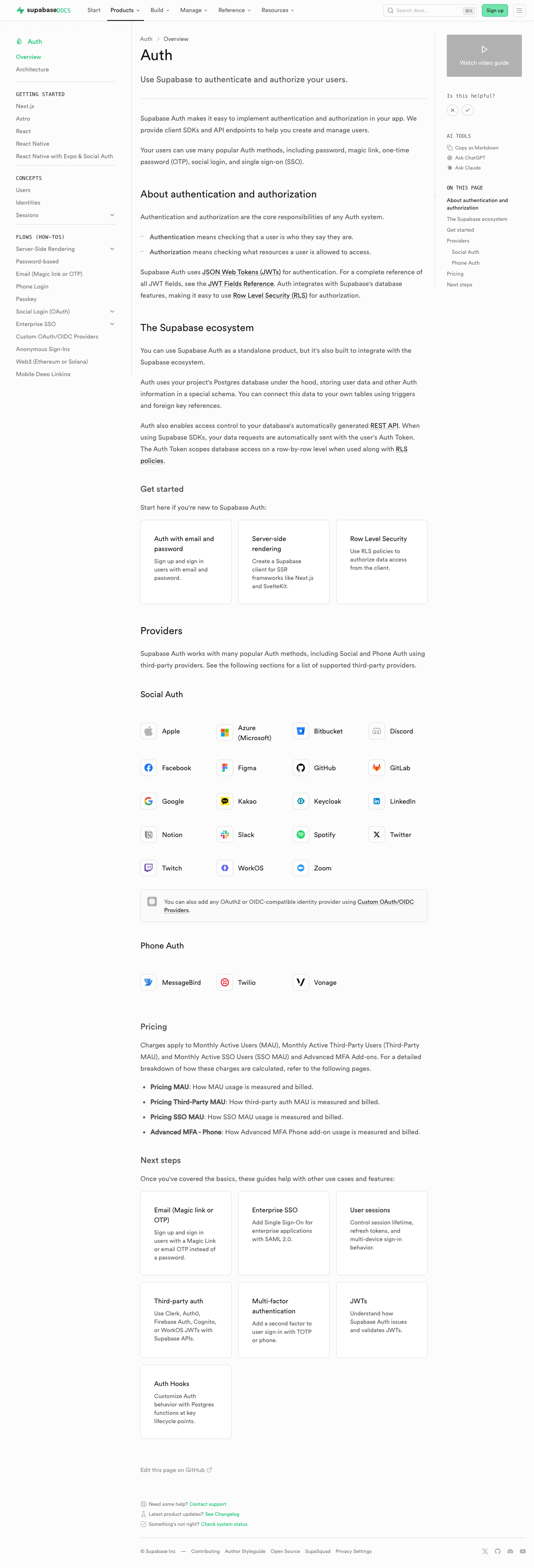
#### Auth
| [Before (production)](https://supabase.com/docs/guides/auth) | [After
(preview)](https://docs-git-fork-nrichers-nikrichers-docs-1032-sta-e2a8cb-supabase.vercel.app/docs/guides/auth)
|
|
---------------------------------------------------------------------------------------------------------------------------
|
---------------------------------------------------------------------------------------------------------------------------
|
| 
| 
|
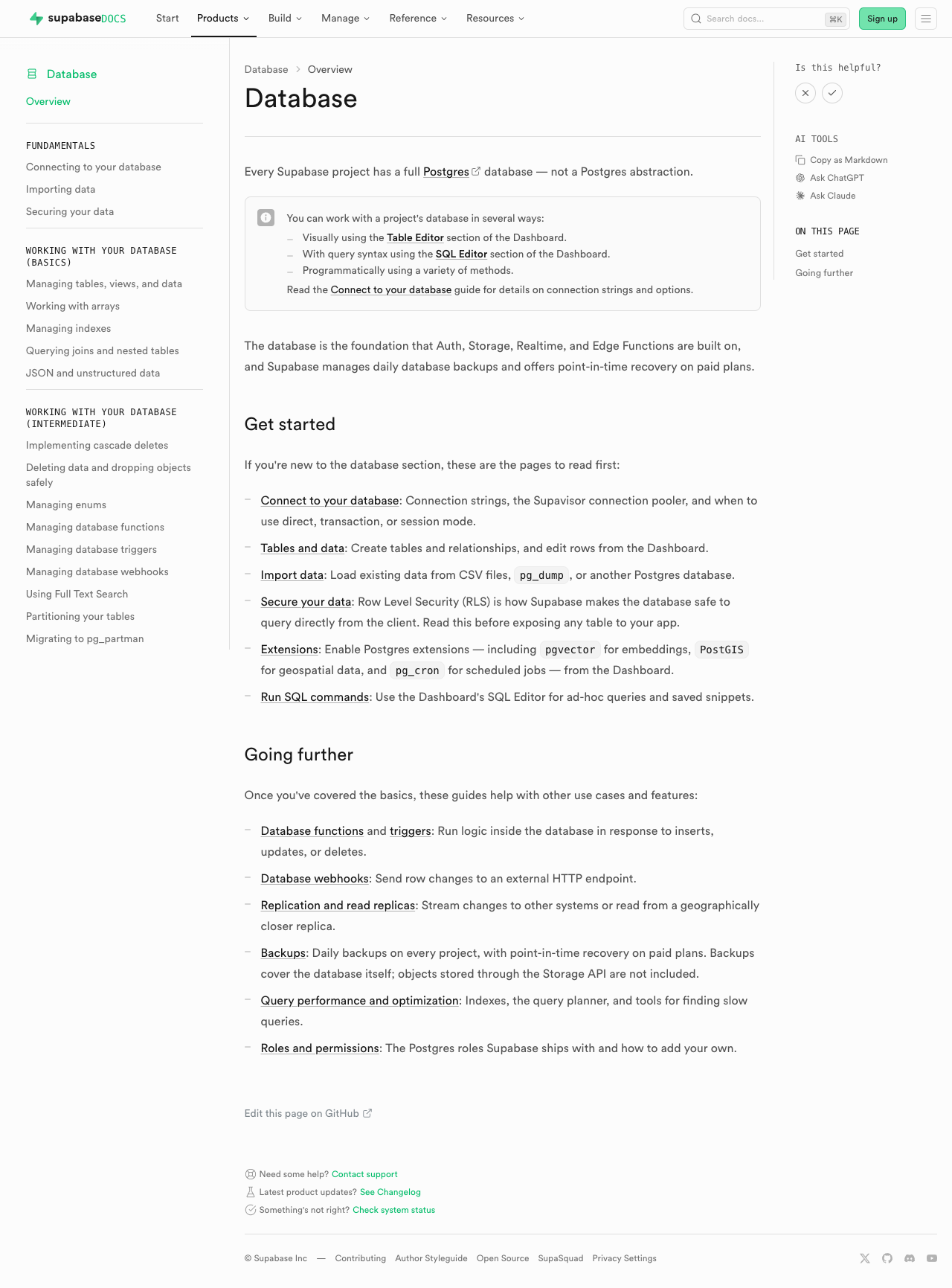
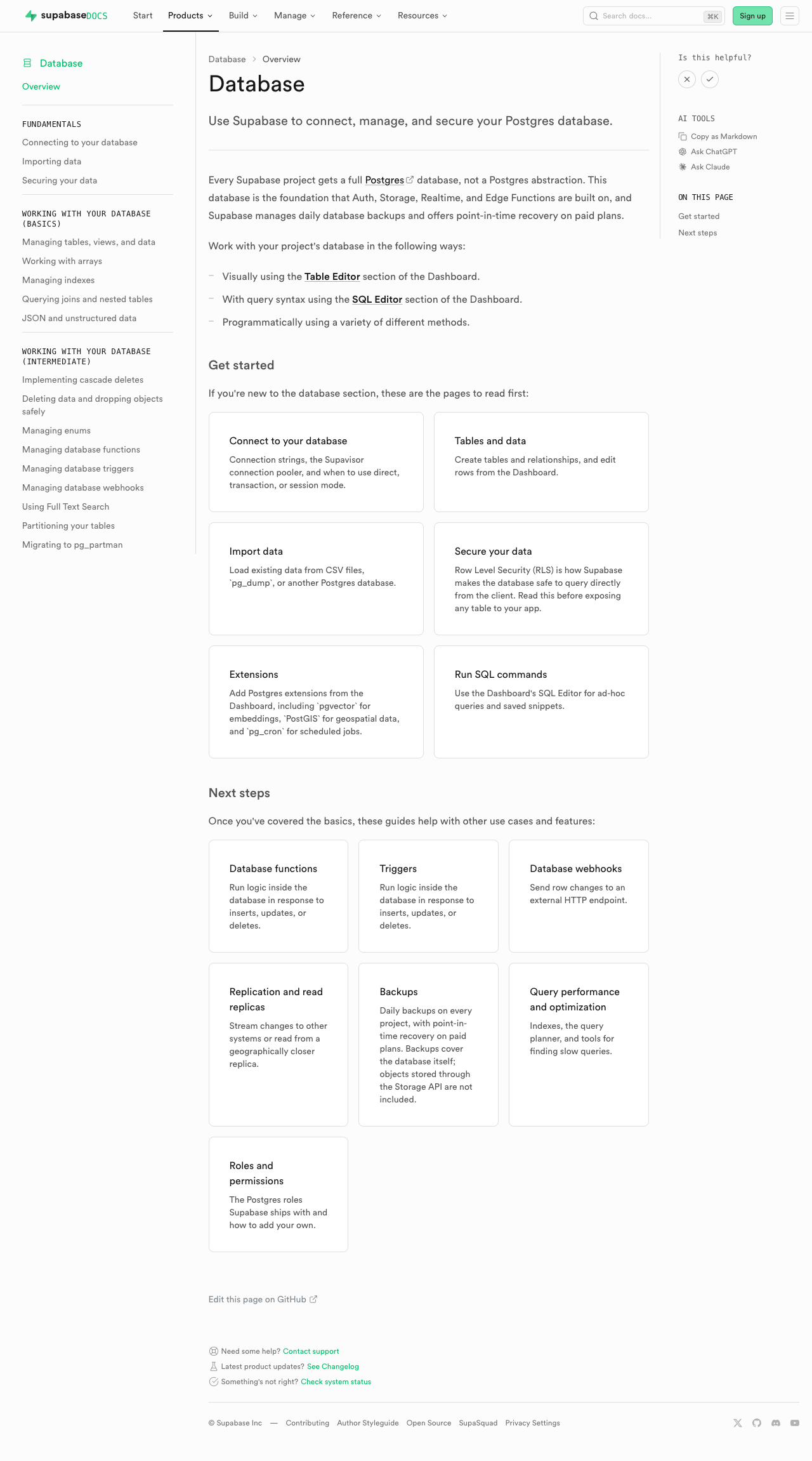
#### Database overview
| [Before
(production)](https://supabase.com/docs/guides/database/overview) |
[After
(preview)](https://docs-git-fork-nrichers-nikrichers-docs-1032-sta-e2a8cb-supabase.vercel.app/docs/guides/database/overview)
|
|
--------------------------------------------------------------------------------------------------------------------------------------------------
|
--------------------------------------------------------------------------------------------------------------------------------------------------
|
| 
| 
|
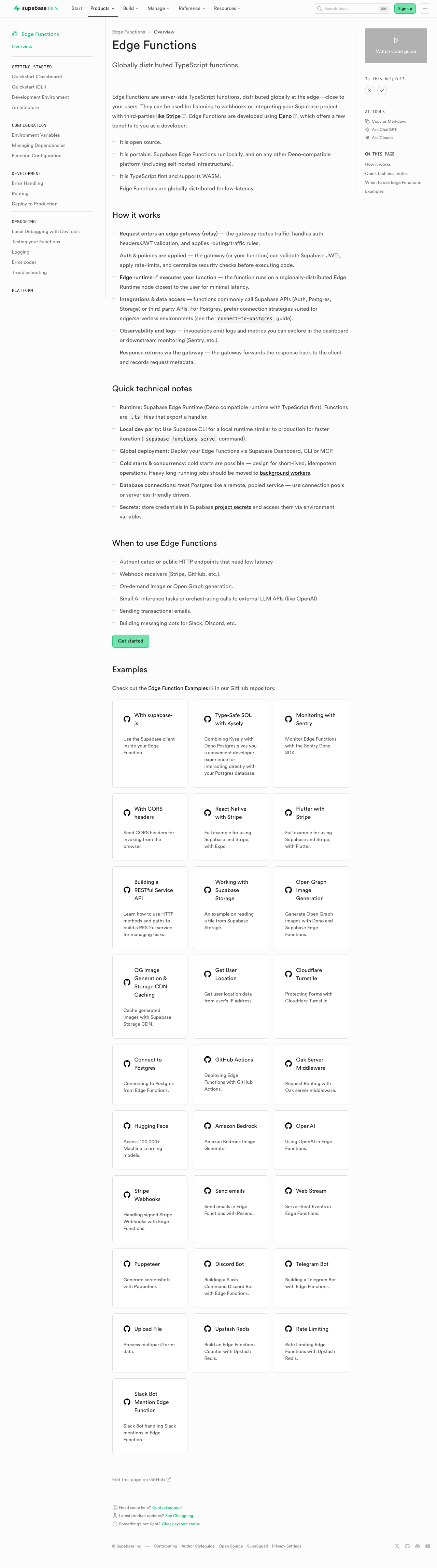
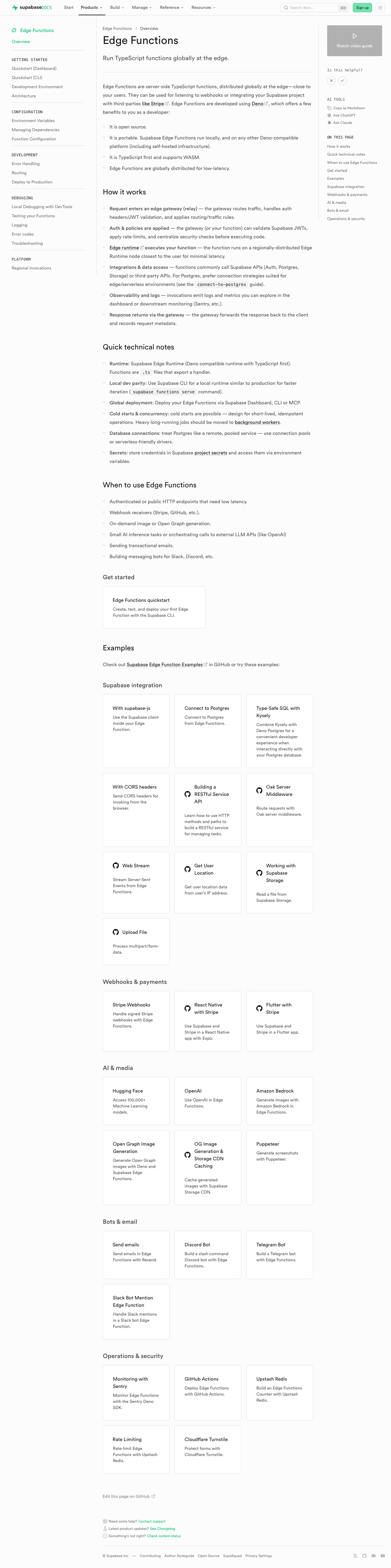
#### Edge Functions
| [Before (production)](https://supabase.com/docs/guides/functions) |
[After
(preview)](https://docs-git-fork-nrichers-nikrichers-docs-1032-sta-e2a8cb-supabase.vercel.app/docs/guides/functions)
|
|
--------------------------------------------------------------------------------------------------------------------------------------------
|
--------------------------------------------------------------------------------------------------------------------------------------------
|
| 
| 
|
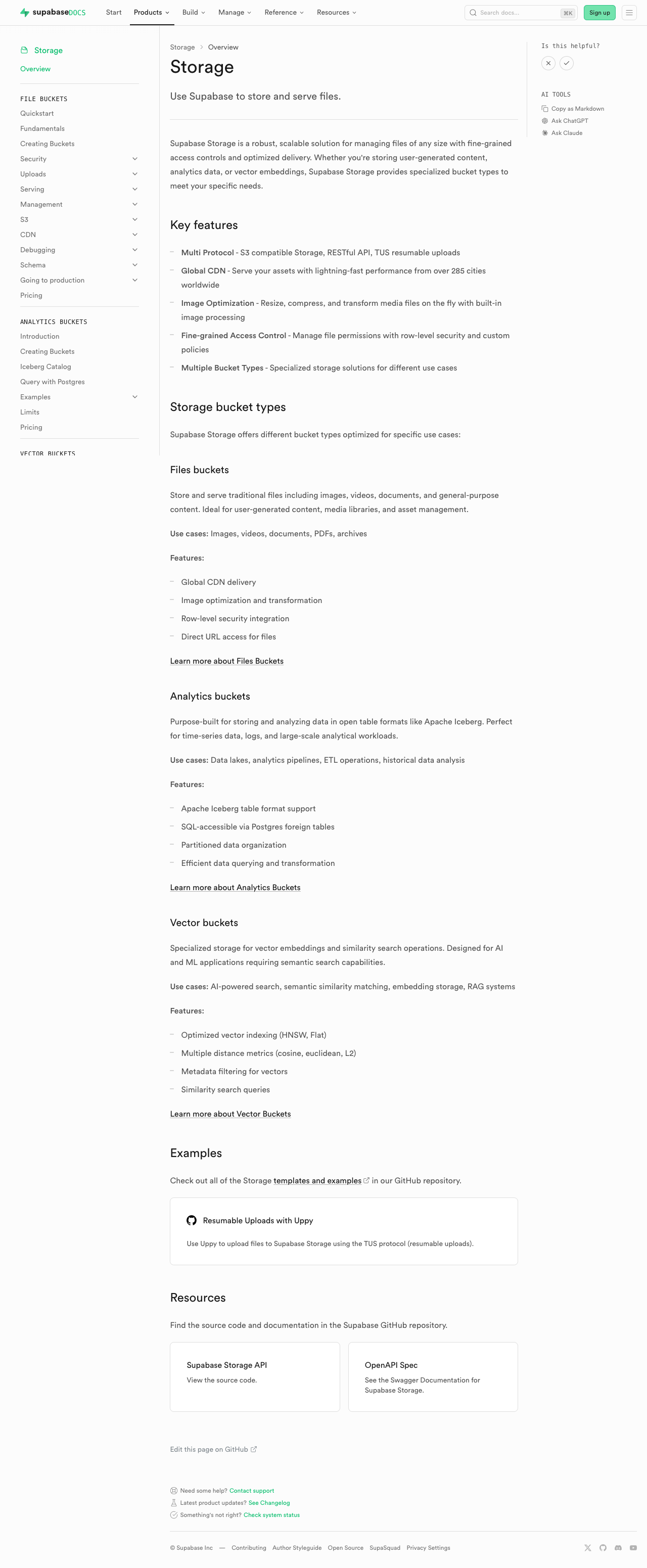
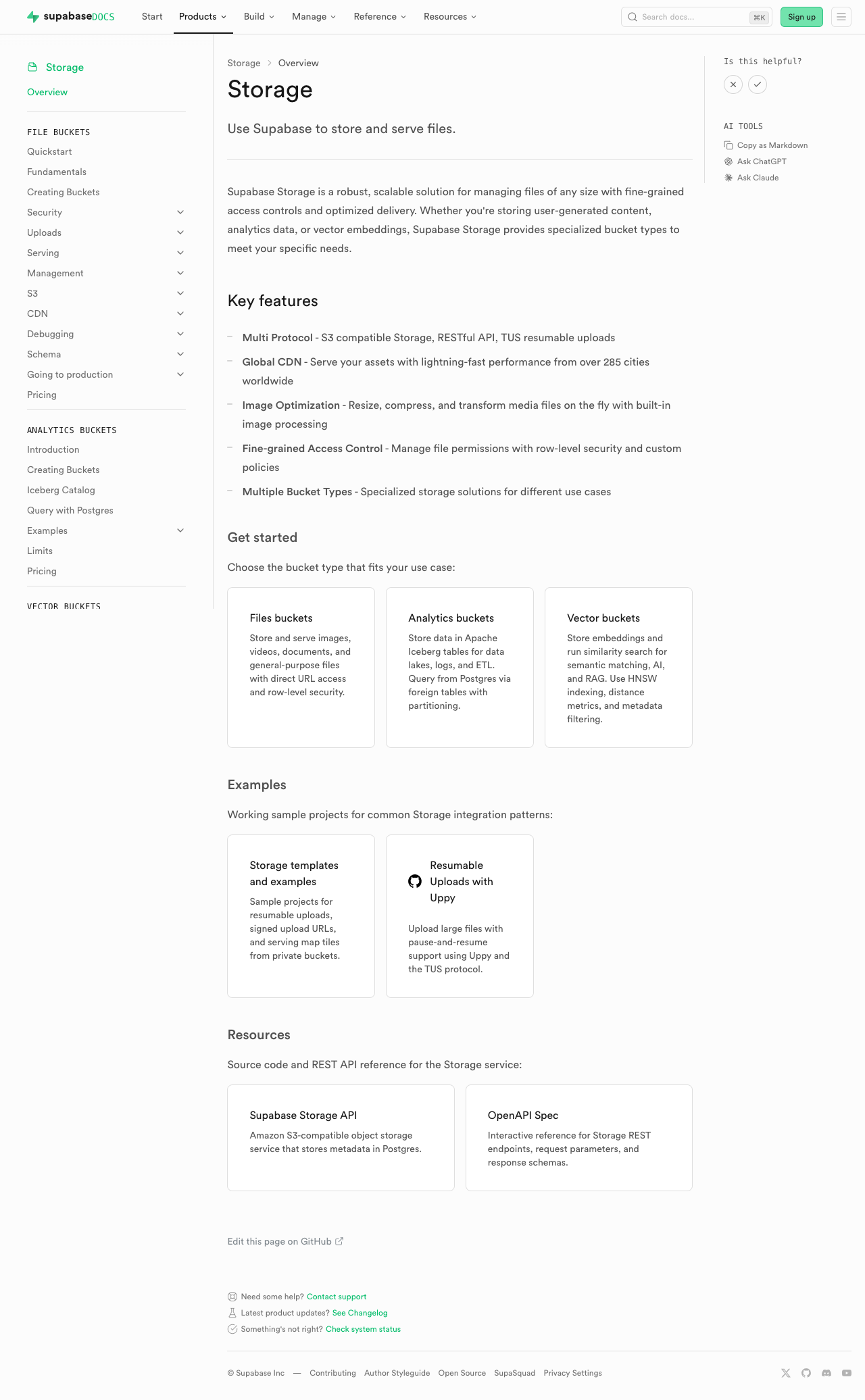
#### Storage
| [Before (production)](https://supabase.com/docs/guides/storage) |
[After
(preview)](https://docs-git-fork-nrichers-nikrichers-docs-1032-sta-e2a8cb-supabase.vercel.app/docs/guides/storage)
|
|
----------------------------------------------------------------------------------------------------------------------------------------
|
----------------------------------------------------------------------------------------------------------------------------------------
|
| 
| 
|
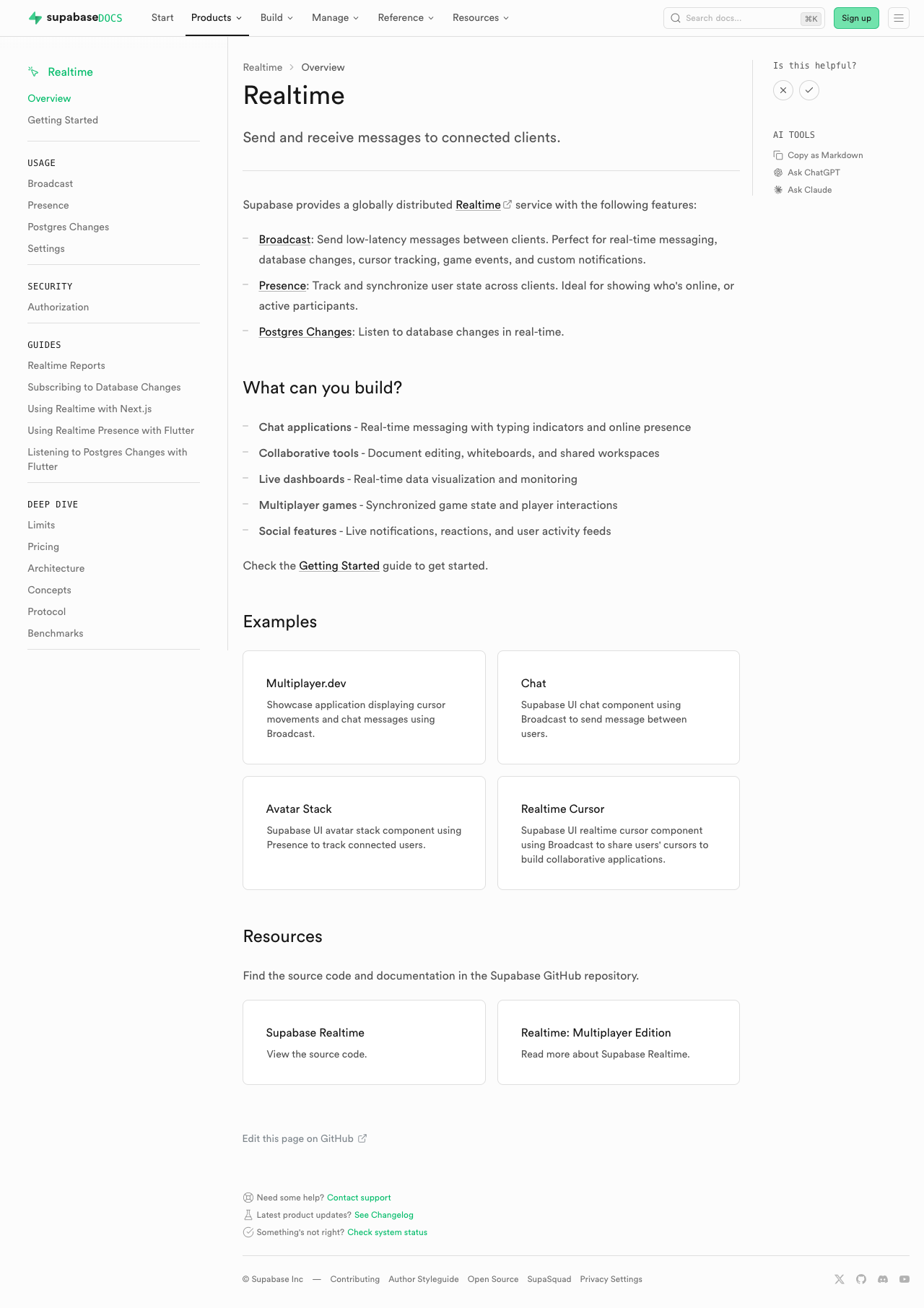
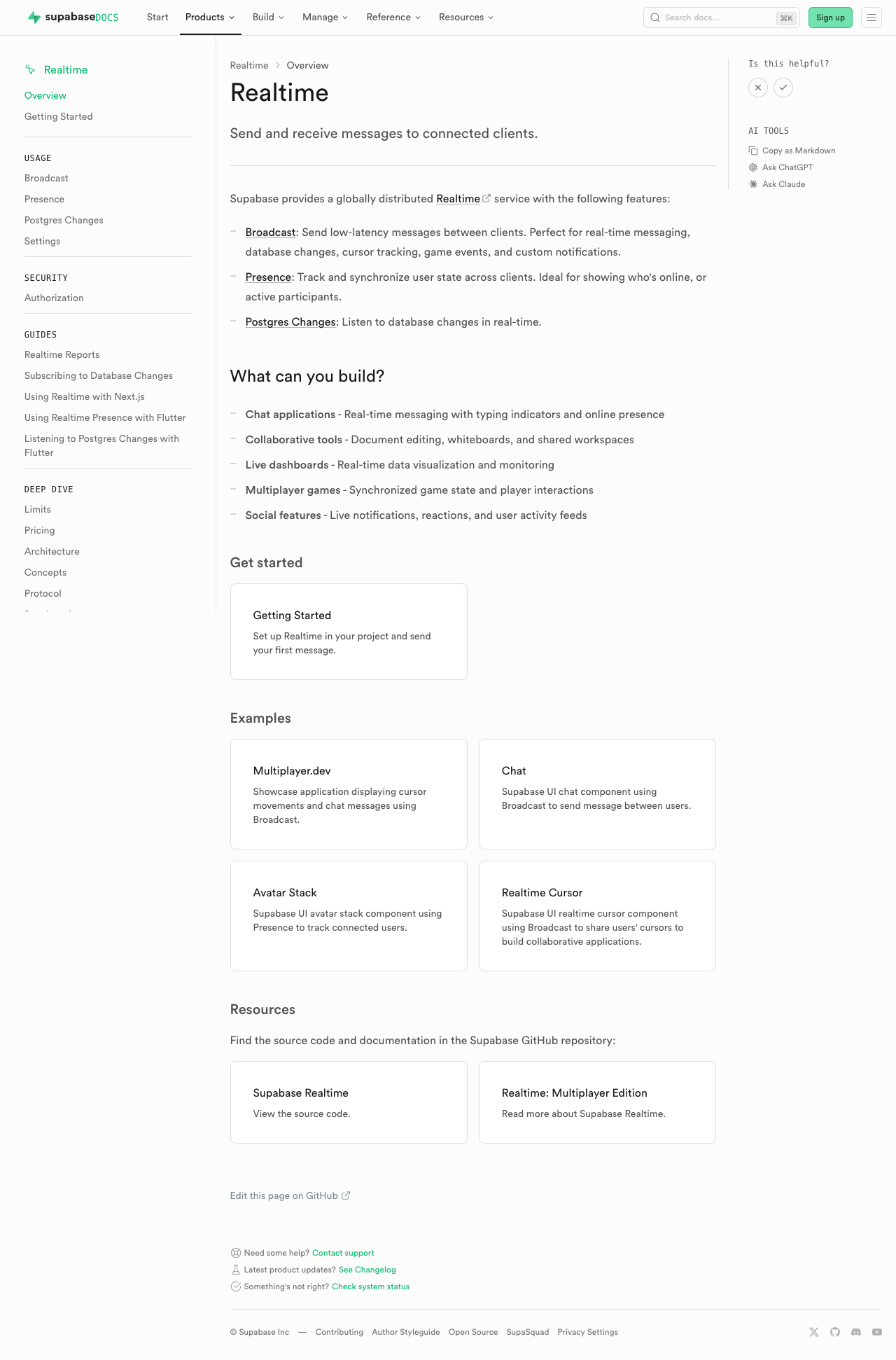
#### Realtime
| [Before (production)](https://supabase.com/docs/guides/realtime) |
[After
(preview)](https://docs-git-fork-nrichers-nikrichers-docs-1032-sta-e2a8cb-supabase.vercel.app/docs/guides/realtime)
|
|
-------------------------------------------------------------------------------------------------------------------------------------------
|
-------------------------------------------------------------------------------------------------------------------------------------------
|
| 
| 
|
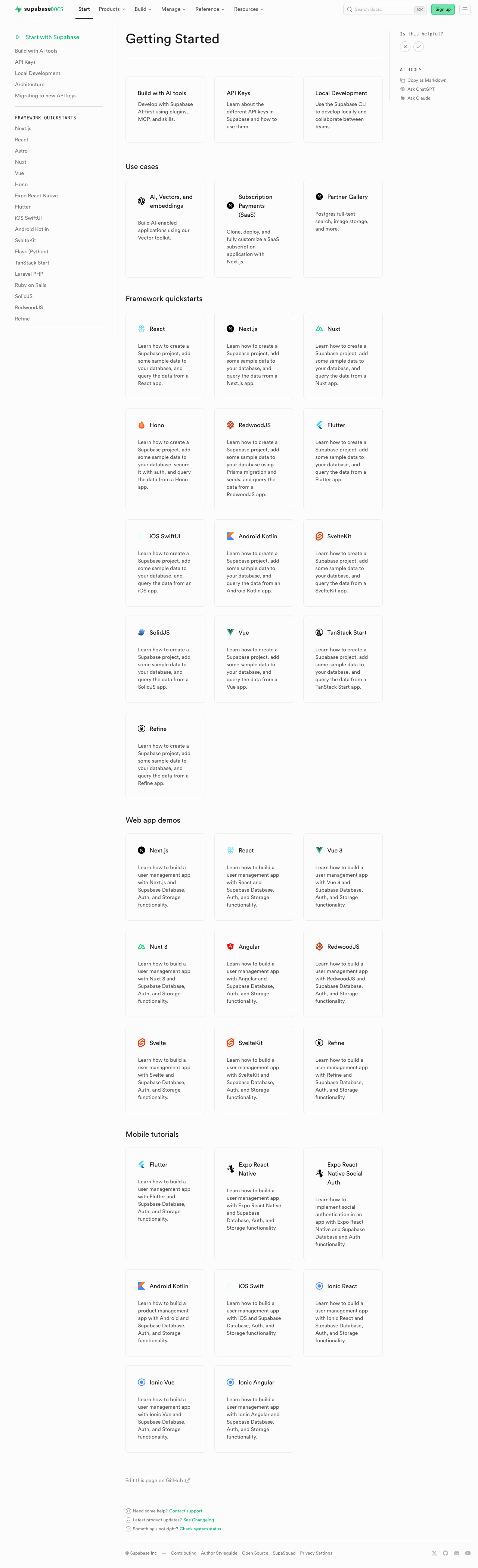
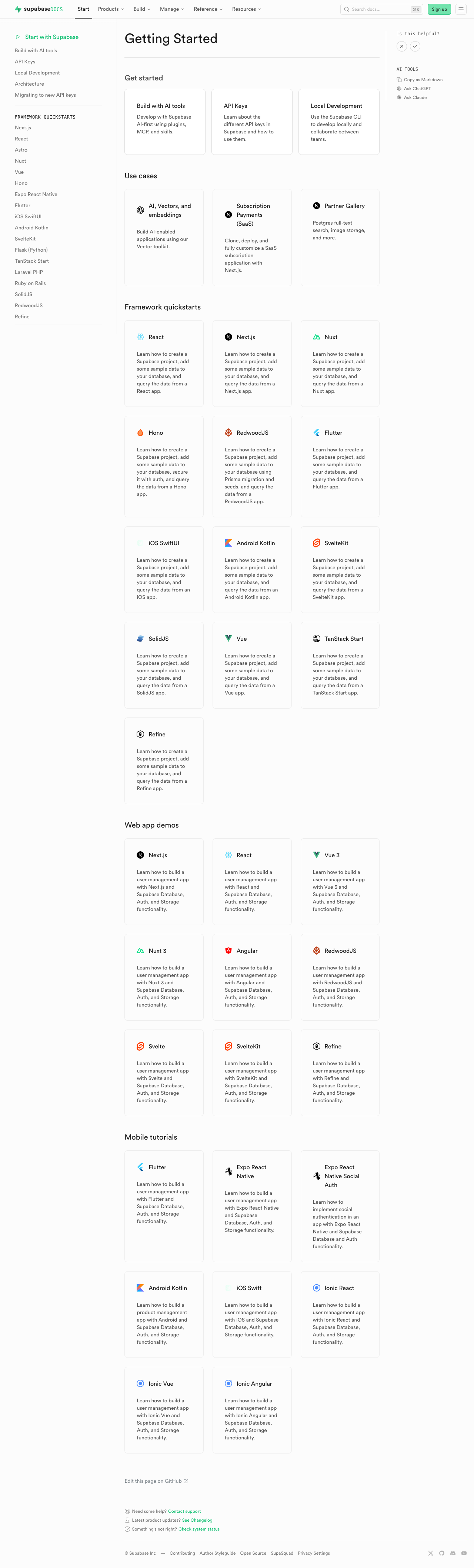
#### Getting Started (partial migration for demoing)
| [Before
(production)](https://supabase.com/docs/guides/getting-started) | [After
(preview)](https://docs-git-fork-nrichers-nikrichers-docs-1032-sta-e2a8cb-supabase.vercel.app/docs/guides/getting-started)
|
|
------------------------------------------------------------------------------------------------------------------------------------------------------
|
------------------------------------------------------------------------------------------------------------------------------------------------------
|
| 
| 
|
### Test plan
- [ ] Visually verify migrated pages render correctly:
- [ ] `/guides/auth` — grid "Get started", conditional pricing list,
grid "Next steps"
- [ ] `/guides/database/overview` — get started + next steps listings
- [ ] `/guides/getting-started` — top 3-column grid
- [ ] `/guides/functions` — get started + example listings
- [ ] `/guides/storage` — get started, examples, resources listings
- [ ] `/guides/realtime` — get started, examples, resources listings
- [ ] Confirm listings render at explicit page positions
- [ ] Click a content listing link and verify
`docs_content_listing_clicked` fires in PostHog with expected properties
(the new `listingId` is the namespaced kebab-case id, e.g.
`storage-get-started`)
- [ ] Build docs and confirm `.md` alternate output includes listing
sections at component placement (e.g.
`public/markdown/guides/storage.md`)
- [ ] Run unit tests: `pnpm test:local lib/content-listings.test.ts` in
`apps/docs`
## Summary by CodeRabbit
## Release Notes
* **New Features**
* Introduced a standardized content listings system for organizing
related guides and resources.
* Content listings now support both grid and list layouts for consistent
presentation.
* Added click telemetry for content listing interactions.
* **Documentation**
* Updated authentication, database, functions, getting started,
realtime, and storage guide pages to use the new content listing
components.
* Improved MDX structure examples and listing markup formatting in
contributor documentation.
<!-- end of auto-generated comment: release notes by coderabbit.ai -->
<!-- This is an auto-generated comment: release notes by coderabbit.ai
-->
## Summary by CodeRabbit
## Release Notes
* **New Features**
* Introduced a new content listings component for displaying guide
content in list and grid layouts across documentation pages.
* Added telemetry tracking for content listing interactions to measure
user engagement.
* **Documentation**
* Updated guide pages (Authentication, Database, Functions, Storage,
Realtime, Getting Started) to use the new listings layout.
* Added contribution guidelines for creating and managing content
listings in documentation.
* **Tests**
* Added comprehensive test coverage for content listings validation,
serialization, and rendering.
<!-- end of auto-generated comment: release notes by coderabbit.ai -->
---------
Co-authored-by: Nik Richers <nik@validmind.ai>
Co-authored-by: Jeremias Menichelli <jmenichelli@gmail.com>
* Add lucide-react to docs (to make the autocomplete work).

* Migrate the docs app icons.

* Migrate the ui-patterns.

* Remove the old icons from ui package.

* Migrate the www app from react-feather icons.

* Migrate all of studio icons.

* Migrate the only component in design-system.

* Fix an old import in ui package. Revert an import in docs app.

* Fix some pages in www.

* Remove unneeded files used in generation of icons.

* Fix a prettier error.

* Fix more issues in www.

* Fix an issue in Log Date picker.

* Replace all string sizes with number sizes because the icons grew in some cases.

* Fix more imports in security page.

* Fix an extra import.

* Remove the size prop from all icons if they're in a button and they match the button size.

* Minor fixes for docs and www.

---------

Co-authored-by: Joshen Lim <joshenlimek@gmail.com>
* Change all imports in the ui package which import via the @ui shortcut.

* Add a new ui-patterns package. Add it to all apps.

* Migrate PrivacySettings from ui to ui-patterns.

* Migrate ConsentToast from ui to ui-patterns.

* Remove providers folder from ui package.

* Move GlassPanel.

* Migrate IconPanel.

* Migrate TweetCard.

* Migrate ThemeImage.

* Remove LWXCountdownBanner.

* Migrate CountdownWidget.

* Migrate SchemaTableNode.

* Migrate ExpandableVideo.

* Migrate ThemeToggle.

* Fix bunch of imports in the docs app.

* Revert some unnecessary changes.

* Expand the README.md.

* Fix the tailwind configs, they were using old folder structure.

* Fix leftover merge conflicts.

* Remove a deleted page in master.

---------

Co-authored-by: Terry Sutton <saltcod@gmail.com>
Updates JS library reference docs with more information regarding on how to use Broadcast from Realtime

---------

Co-authored-by: Kevin Grüneberg <k.grueneberg1994@gmail.com>