 2e0551e845
* fixed typo

* fixed stocka typo

---------

Co-authored-by: Danglewood <85772166+deeleeramone@users.noreply.github.com>
Co-authored-by: James Maslek <jmaslek11@gmail.com>
Co-authored-by: DidierRLopes <dro.lopes@campus.fct.unl.pt>
5.2 KiB
Vendored
title, sidebar_position, description, keywords
| title | sidebar_position | description | keywords | ||||||||||||||||
|---|---|---|---|---|---|---|---|---|---|---|---|---|---|---|---|---|---|---|---|
| Data sources | 1 | This page provides useful information on dealing with different data vendors when using OpenBB's Terminal. It outlines how to select a default data source, acquire API keys, and switch the data vendor using specific commands, all in an effort to streamline and improve the user's experience. |
|
import HeadTitle from '@site/src/components/General/HeadTitle.tsx';
import TutorialVideo from '@site/src/components/General/TutorialVideo.tsx';
Relationship With Data Vendors
Most commands will require obtaining API keys from various data providers. OpenBB provides methods for consuming these data feeds, but has no control over the quality or quantity of data provided to an end-user. No API Keys are required to get started using the Terminal.
See the list of data providers here, along with instructions for entering the credentials into the OpenBB Terminal. You can also request a new data source through this form.
:::note OpenBB doesn't store any financial data in its servers. We aggregate access to multiple data sources through API calls and standardize that interaction to provide users a seamless experience when dealing with different data vendors :::
Changing the Data Source In-Command
Many commands have multiple data sources associated with it. A great example is /stocks/fa/income, which allows you to select FinancialModelingPrep, Polygon, AlphaVantage, EODHD or YahooFinance. In order to specify the data vendor for that particular command, use the --source argument.
This also becomes clear from the help menu.
/stocks/fa/income -h
usage: income [-t TICKER] [-q] [-r] [-p column] [-h] [--export EXPORT] [--sheet-name SHEET_NAME [SHEET_NAME ...]] [-l LIMIT] [--source {FinancialModelingPrep,Polygon,AlphaVantage,EODHD,YahooFinance}]

Prints a complete income statement over time. This can be either quarterly or annually.

optional arguments:
  -t TICKER, --ticker TICKER
                        Ticker to analyze (default: None)
  -q, --quarter         Quarter fundamental data flag. (default: False)
  -r, --ratios          Shows percentage change of values. (default: False)
  -p column, --plot column
                        Rows to plot, comma separated. (-1 represents invalid data) (default: None)
  -h, --help            show this help message (default: False)
  --export EXPORT       Export raw data into csv, json, xlsx (default: )
  --sheet-name SHEET_NAME [SHEET_NAME ...]
                        Name of excel sheet to save data to. Only valid for .xlsx files. (default: None)
  -l LIMIT, --limit LIMIT
                        Number of entries to show in data. (default: 5)
  --source {FinancialModelingPrep,Polygon,AlphaVantage,EODHD,YahooFinance}
                        Data source to select from (default: FinancialModelingPrep)

For more information and examples, use 'about income' to access the related guide.
Within the source arguments it shows the available sources. An API key may be required to use a source, see this page for insructions on obtaining and setting credentials.
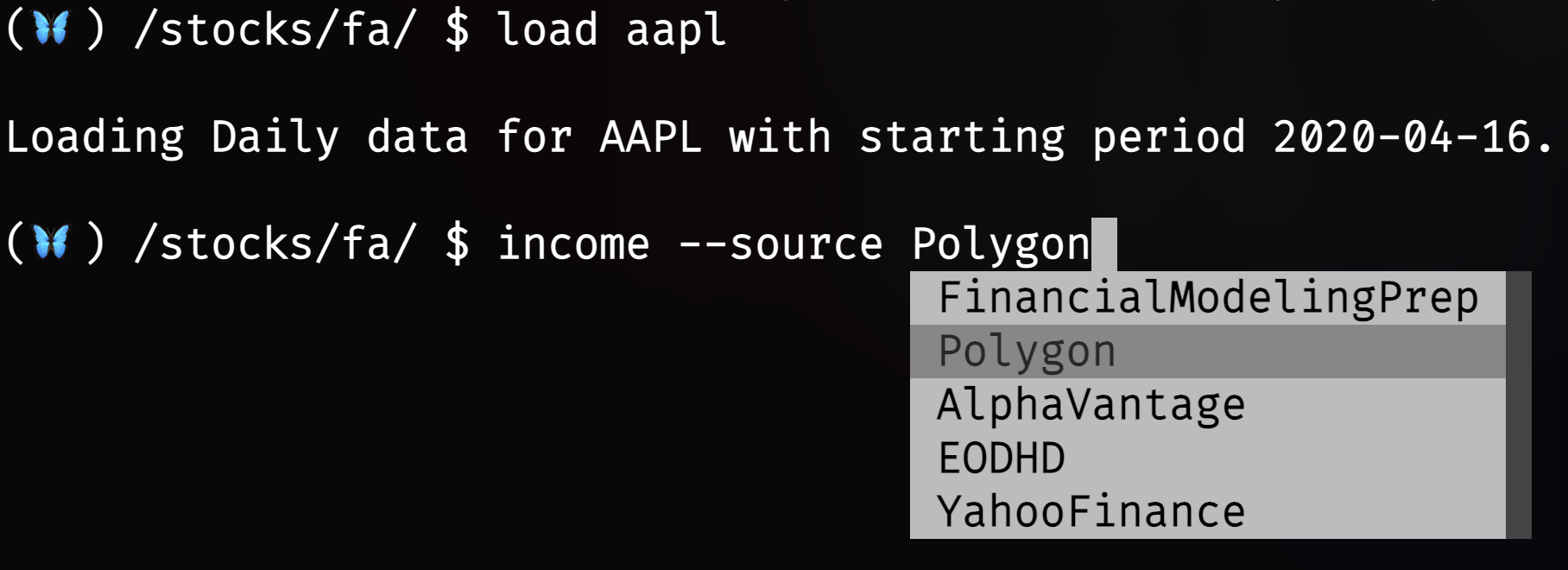
The available sources for each command are displayed on the right of the command, and they can be distinguished by the square brackets and distinct font color group. By default, if the user doesn't specify --source the Terminal will use the first data provider displayed.
Setting Default Source Through Hub (easy)
The default data vendor can be selected with more ease through the OpenBB Hub. Instructions can be found here.
Setting Default Source Through Terminal
The default data source for each command (where multiple sources are available) can be defined within the /sources menu.
For example, changing the default data provider for the income command:
/sources/get --cmd stocks/fa/income
Default   : FinancialModelingPrep
Available : FinancialModelingPrep, Polygon, AlphaVantage, EODHD, YahooFinance
Then, change the default data provider with the, set, command. For example, change the data provider to Polygon with
the following:
/sources/set --cmd stocks/fa/income --source Polygon
A confirmation message is displayed.
Default data source for 'stocks/fa/income' set to 'Polygon'.
Using, get, once more will confirm the update:
/sources/get --cmd stocks/fa/income
Default   : Polygon
Available : Polygon, FinancialModelingPrep, AlphaVantage, EODHD, YahooFinance