 4ad995fdd0
* add first iteration of content for Terminal Pro

* Update index.md

* Update dashboards.md

* Update folders.md

* Update grouping.md

* Update report.md

* Update templates.md

* Update quick-start.md

* Update index.md

* Update index.md

* Update home.md

* Update news.md

* Update index.md

* Update index.md

* Update index.md

* Update data-provider.md

* Update chat-with-widget.md

* Update data-manipulation.md

* Update forecasting.md

* fix: images self closing tags

* fix: only pro visitors can see pro

* inter font

* improve SEO content and restructuring

* add new package for toggle on tutorials

* move folder around

* improve main page of each prod

* small updates and improvements

* fix logo above

* small improvement in headtitle for portfolio funcs

* fix typos from OpenAI's GPT-4

* fix _category_ json

* remove generic SEO words

* add script that generates SEO for documentation

* add missing file

* remove sdk warning message

* fix links for andrew

---------

Co-authored-by: jose-donato <zmcdonato@gmail.com>
Co-authored-by: jose-donato <43375532+jose-donato@users.noreply.github.com>
Co-authored-by: andrewkenreich <andrew.kenreich@gmail.com>
8.9 KiB
Vendored
title, description, keywords
| title | description | keywords | |||||||||||
|---|---|---|---|---|---|---|---|---|---|---|---|---|---|
| Quantitative Analysis | The page provides a comprehensive guide on how to use the 'qa' module of the Terminal's Quantitative Analysis menu for SDK environment. It contains detailed information about the grouping of functions into categories, examples on their usage, and how they provide users more ways to interact with the function library. |
|
import HeadTitle from '@site/src/components/General/HeadTitle.tsx';
The qa module is the Terminal's Quantitative Analysis menu for the SDK environment. It provides users with more ways to interact with the library of functions, and provides cross-disciplinary utility. To activate the code completion for the menu, enter . after, openbb.qa.
How to Use
The functions of the qa module are grouped into categories, listed below along with a short description.
| Path | Type | Description |
|---|---|---|
| openbb.qa.acf | Plot | Plots Auto and Partial Correlation of Returns and Change in Returns |
| openbb.qa.bw | Plot | Box and Whisker Plot |
| openbb.qa.calculate_adjusted_var | Risk | Calculates VaR, adjusted for skew and kurtosis (Cornish-Fisher-Expansion) |
| openbb.qa.cdf | Plot | Plots the Cumulative Distribution Function |
| openbb.qa.cusum | Plot | Plots the Cumulative Sum Algorithm |
| openbb.qa.decompose | Plot | Decomposition in Cyclic-Trend, Season & Residuals of Prices |
| openbb.qa.es | Statistics | Expected Shortfall per percentile |
| openbb.qa.kurtosis | Rolling Metrics | Rolling Kurtosis of Distribution of Prices |
| openbb.qa.line | Plot | Customizable Line Plot, With Annotations |
| openbb.qa.normality | Statistics | Normality Statistics and Tests |
| openbb.qa.omega | Risk | Omega Ratio (Risk/Return Performance Measure) |
| openbb.qa.quantile | Rolling Metrics | Rolling Median and Quantile of Prices |
| openbb.qa.qqplot | Plot | QQ Plot for Data Against Normal Quantiles |
| openbb.qa.rolling | Rolling Metrics | Rolling Mean and Standard Deviation of Prices |
| openbb.qa.sharpe | Risk | Sharpe Ratio (Measure of Risk-Adjusted Return) |
| openbb.qa.skew | Rolling Metrics | Rolling Skewness of Distribution of Prices |
| openbb.qa.sortino | Risk | Sortino Ratio Risk Adjustment Metric |
| openbb.qa.spread | Rolling Metrics | Rolling Variance and Standard Deviation of Prices |
| openbb.qa.summary | Statistics | A Brief Summary of Statistics for the DataFrame |
| openbb.qa.unitroot | Statistics | Normality Statistics and Tests |
| openbb.qa.var | Risk | Value at Risk |
Examples
Import Statements
The examples below will assume that the following statements are included in the first block of code:
import quandl
import pandas as pd
from openbb_terminal.sdk import openbb
from openbb_terminal import config_terminal as cfg

# %matplotlib inline (uncomment if using a Jupyter environment)
Get Data
This example collects data from Nasdaq Data Link, and requires registering for a free API key. Qunadl is the Python client for the Nasdaq Data Link API.
shiller_pe_rdiff = quandl.get('MULTPL/SHILLER_PE_RATIO_MONTH', collapse = 'monthly', transform = 'rdiff', api_key = cfg.API_KEY_QUANDL)
shiller_pe_rdiff.rename(columns={'Value':'P/E % Change'}, inplace = True)
shiller_pe_ratio = quandl.get('MULTPL/SHILLER_PE_RATIO_MONTH', collapse = 'monthly', api_key = cfg.API_KEY_QUANDL)
shiller_pe_ratio.rename(columns={'Value':'P/E Ratio'}, inplace = True)

sp500_inf_adj = quandl.get('MULTPL/SP500_INFLADJ_MONTH', collapse = 'monthly', api_key = cfg.API_KEY_QUANDL)
sp500_inf_adj.rename(columns = {'Value': 'S&P Inflation-Adjusted Value'}, inplace = True)
sp500_inf_adj_rdiff = quandl.get('MULTPL/SP500_INFLADJ_MONTH', collapse = 'monthly', transform = 'rdiff', api_key = cfg.API_KEY_QUANDL)
sp500_inf_adj_rdiff.rename(columns = {'Value':'S&P 500 % Change'}, inplace = True)

shiller_pe = shiller_pe_ratio.join(shiller_pe_rdiff)
sp500_inf_adj = sp500_inf_adj.join(sp500_inf_adj_rdiff)

sp500_df = sp500_inf_adj.join(shiller_pe)

sp500_df
| Date | S&P Inflation-Adjusted Value | S&P 500 % Change | P/E Ratio | P/E % Change |
|---|---|---|---|---|
| 2022-08-31 00:00:00 | 3955 | 0.0092504 | 29.64 | 0.022069 |
| 2022-09-30 00:00:00 | 3585.62 | -0.0933957 | 26.84 | -0.0944669 |
| 2022-10-31 00:00:00 | 3871.98 | 0.0798635 | 28.53 | 0.0629657 |
| 2022-11-30 00:00:00 | 3856.1 | -0.00410126 | 28.37 | -0.00560813 |
This particular data series contains 150 years of monthly values. It is among the longest uninterrupted timeseries available in the public domain, and it is cited frequently in macroeconomic research.
Summary
Get a summary of statistics for each column with qa.summary:
openbb.qa.summary(sp500_df)
| S&P Inflation-Adjusted Value | S&P 500 % Change | P/E Ratio | P/E % Change | |
|---|---|---|---|---|
| count | 1823 | 1822 | 1822 | 1821 |
| mean | 697.396 | 0.0028703 | 16.9914 | 0.00137084 |
| std | 834.501 | 0.0424378 | 7.07094 | 0.0412196 |
| min | 80.31 | -0.264738 | 4.78 | -0.268992 |
| 10% | 152.404 | -0.0447494 | 9.31 | -0.0449735 |
| 25% | 203.47 | -0.0172803 | 11.7 | -0.0183028 |
| 50% | 309.83 | 0.00553122 | 15.895 | 0.00446999 |
| 75% | 778.42 | 0.0260009 | 20.5575 | 0.0246575 |
| 90% | 1907.87 | 0.04505 | 26.467 | 0.0426357 |
| max | 4786.79 | 0.514085 | 44.19 | 0.511986 |
| var | 696392 | 0.00180097 | 49.9982 | 0.00169906 |
Spread
Add the variance and standard deviation, over a specified window (three-months), to the DataFrame:
std,variance = openbb.qa.spread(data = sp500_df['S&P 500 % Change'], window = 3)
std.rename(columns = {'STDEV_3':'Three-Month Standard Deviation'}, inplace = True)
variance.rename(columns = {'VAR_3': 'Three-Month Variance'}, inplace =True)
sp500_df = sp500_df.join([std,variance])
sp500_df.rename_axis('date', inplace = True)
sp500_df.tail(2)
| date | S&P Inflation-Adjusted Value | S&P 500 % Change | P/E Ratio | P/E % Change | Three-Month Standard Deviation | Three-Month Variance |
|---|---|---|---|---|---|---|
| 2022-10-31 00:00:00 | 3871.98 | 0.0798635 | 28.53 | 0.0629657 | 0.0871217 | 0.00759019 |
| 2022-11-30 00:00:00 | 3856.1 | -0.00410126 | 28.37 | -0.00560813 | 0.0866432 | 0.00750705 |
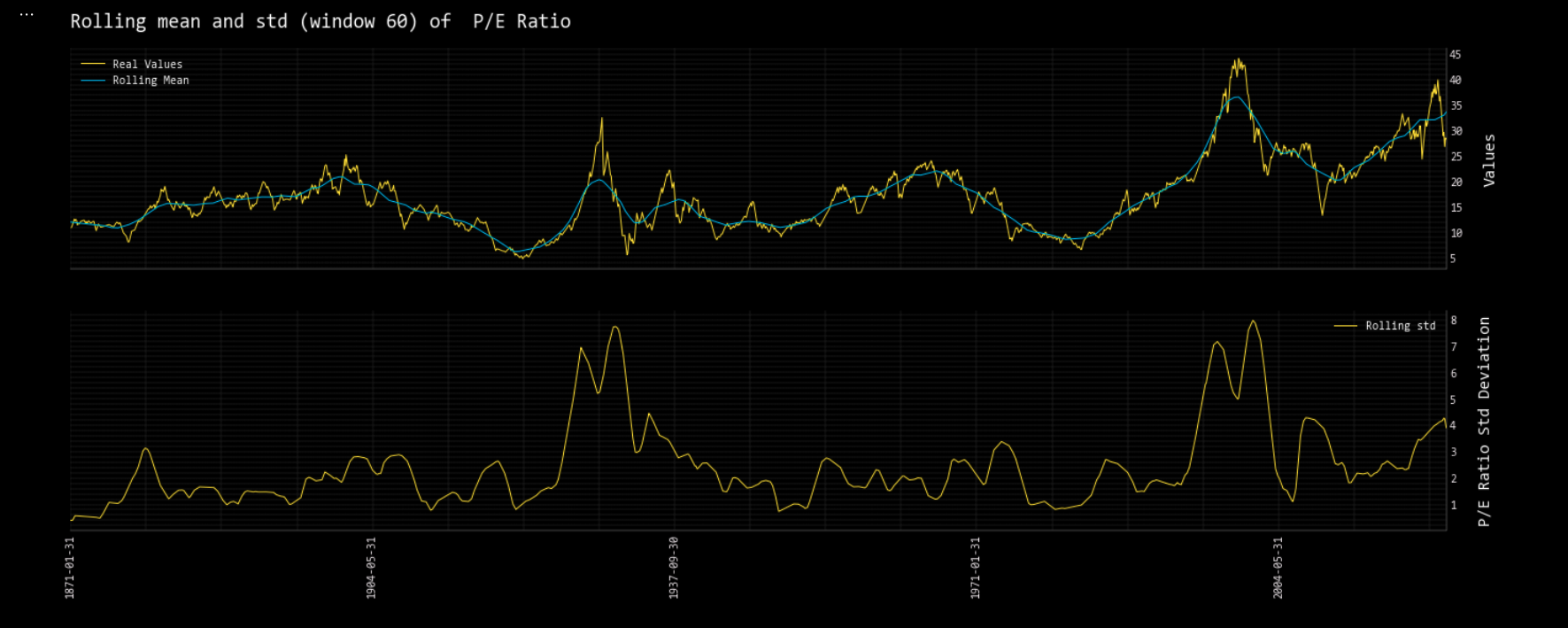
The rolling mean average and standard deviation is calculated with the rolling command. Adding, _chart, to this will return an inline chart within a Jupyter Notebook. For the example below, window, 60, represents a five-year period.
Rolling
openbb.qa.rolling_chart(sp500_df, target = 'P/E Ratio', window = 60, symbol = '')
Unit Root Test
Perform a unit root test with unitroot:
help(openbb.qa.unitroot)

        Parameters
        ----------
        data : pd.DataFrame
            DataFrame of target variable
        fuller_reg : str
            Type of regression of ADF test. Can be ‘c’,’ct’,’ctt’,’nc’ 'c' - Constant and t - trend order
        kpss_reg : str
            Type of regression for KPSS test.  Can be ‘c’,’ct'

        Returns
        -------
        pd.DataFrame
            Dataframe with results of ADF test and KPSS test

openbb.qa.unitroot(sp500_df['P/E % Change'])
| ADF | KPSS | |
|---|---|---|
| Test Statistic | -10.7075 | 0.34061374135067696 |
| P-Value | 3.3972e-19 | 0.1 |
| NLags | 20 | 2 |
| Nobs | 1800 | |
| ICBest | -6491.14 |